Finding Your Feet with Adobe Developer App Builder
App Builder’s flexibility and accessibility make it a highly useful tool for creating solutions to your project issues, even if you’re not technically a developer. But how do you get started?
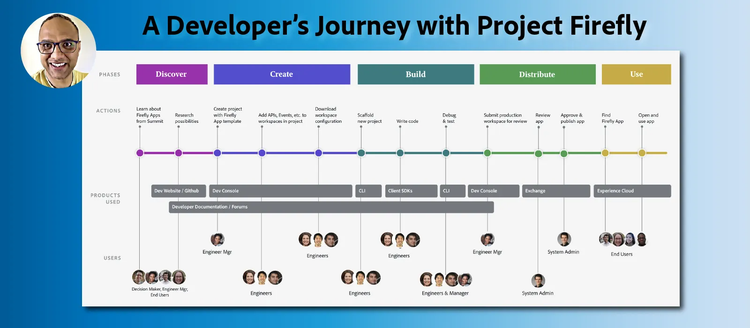
People discover new tools and platforms in a variety of different ways.
Maybe you’re the sort of person who likes to keep on top of trends, taking the time to skim each new release to see if it looks exciting. Maybe you’ve moved to another company and need to get up to speed with their tools and technology quickly. In Anil Vasant Umachigi’s case, it was because he had a problem that needed solving.
Anil works for Accent Group, a wholesale distributor of sneakers with more than 500 stores and 20 online platforms. Accent was looking to implement an Adobe marketing tech stack, but there was a slight irritation. Every time he wanted to compare key metrics year-over-year, he’d have to access the previous data in Google Analytics and check them against current metrics in Adobe Analytics.
“This is where I decided to create a custom dashboard which would help organize data in one place, thus giving the organization a smoother transition, and saving time and effort for business users,” he said.
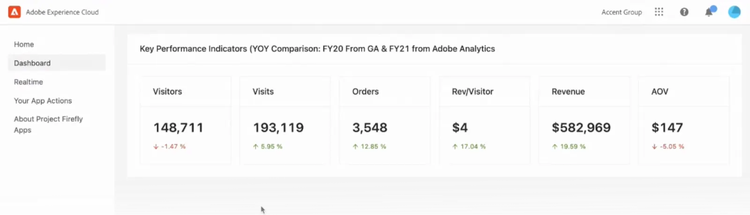
The custom dashboard Anil created, using App Builder.
Anil ended up creating a dashboard that grabbed the data from Adobe and other internal APIs and brought all this data together. He demonstrated his dashboard in a recent episode of Exploring Adobe Developer App Builder, our livestream series that keeps customers up to date with case studies, features, and technical advice.
The thing is, Anil wouldn’t describe himself as a developer. He graduated with a degree in microbiology, became a data analyst, and got into code in the way that many others do: By dipping into new tools, languages, and frameworks that would help him do his job better, and slowly learning the ropes.
Watch the recording:
Watch Anil’s interview on the Exploring Adobe Developer App Builder video series
How to get started with App Builder
Anil is a big advocate of App Builder for non-developers looking to adapt or automate business processes. We asked him a few questions, all based on his first (and very successful) experience building with App Builder.
Q: What if I’m interested in App Builder…but I’m not an engineer?
There are quite a few data analysts like me who have turned into data engineers, simply by working overtime, making little changes to capture data, handling tag management systems, enhancing reporting using APIs, and finally building automation and dashboards for stakeholders.
“I was very specific about what I needed, and when I saw App Builder for the first time, I was really excited, because I saw it could deliver that. I realized the potential pretty quickly.”
How should you approach App Builder to make sure you get the most out of it? Anil shares a process that he believes might help users discover its full potential.
App Builder is designed to give people everything they might want to build custom scalable web apps. But one of its major benefits is its flexibility.
For example, while React Spectrum is generally leveraged to help develop the front end in App Builder applications, Anil was also able to draw on libraries he was already familiar with, such as ANTD. That shortened his learning curve considerably.
Q: How do I get familiar with App Builder and see if it can work for me?
“I started off with a use case and reviewed App Builder to check if it ticked all the boxes,” he said. “That’s one way of doing it, but I would definitely say there’s nothing better than getting your hands dirty.”
“Take some time to understand the capabilities, features, and technology stack. Look at what App Builder is, what it’s built on, and what the developer experience is like. Try out CodeLabs to get to know different features of App Builder, and learn to log and debug in the early days. That will save you lots of time in the future.”
Q: How do you pick your first App Builder project?
Anil recommends sitting down and making a list of all the Adobe Experience Cloud products you have and familiarizing yourself with their features. Then work with various business stakeholders, including tech teams and data analysts, and identify use cases.
While Anil’s first project was a dashboard, he’s got a whole list of use cases in his back pocket that he wants to try with App Builder, including an app that allows users to upload and repair data.
In this process, he advises that you look for what he calls “High Leverage Activity.”
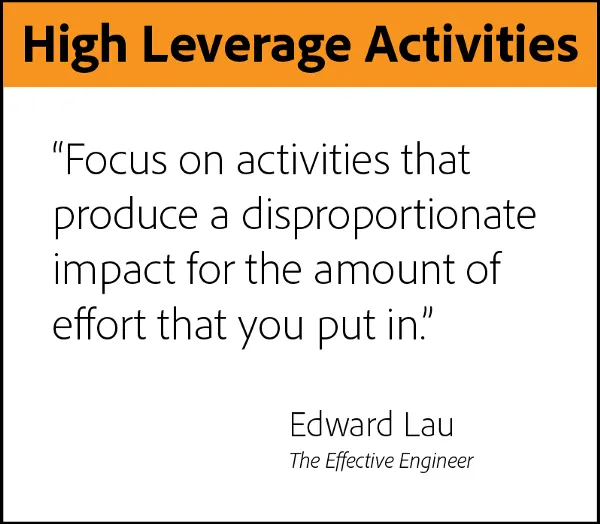
Anil recommends looking for “high leverage activities” when you’re deciding on potential projects.
“You’re looking for an activity you can do in the short term that impacts your project performance for a long time.
“For example, maybe you’re spending a lot of time onboarding new hires. In that case, setting up an onboarding app in the cloud might give them a sense of where to start and what to look for, and you can update it if something changes, or connect it to other apps to make it more dynamic. That way, you’re getting so much time back.”
Q: What resources are available to help me build my first App Builder app?
Anil suggests first creating example apps in CodeLabs, understanding the console, and building a prototype.
“Don’t be afraid to lean on the documentation, and use YouTube tutorials. I’m also a huge fan of the logging libraries. I spent a lot of time looking at what I did wrong, and that really helped me.”
“Adobe I/O CodeLabs was huge for me. I would read documentation, and look for examples of how things were done. And then I’d spend a lot of time there trying to understand how to replicate them, and do other things.
“In addition, I was always looking at content on YouTube to help understand various features, and Adobe’s Experience League community was always there to answer questions. There’s a lot of interesting discussion happening there.”
Q: How does building with App Builder compare to developing an app from scratch?
“Up until now, we’ve been using custom tools and sometimes building systems based on various technologies, and made them available locally in a machine or on a server. A platform like App Builder changes a lot of this for data teams.
“It’s a fantastic framework. It helps you build custom, cloud-native Adobe apps, and more importantly, it helps you create microservices across various functions and tasks for our business stakeholders.
“I like the idea of not worrying about infrastructure, security, and identity management because they’re packaged within one framework with the latest technology, such as Jamstack and React. That, as well as access to Adobe’s API, has been a key driver for us to adopt App Builder.”
Q: Once my App Builder app is built, how do I distribute it?
One big plus of App Builder is that — when you get to the “bringing in users” stage — a lot of what you need is included within the Adobe Experience Cloud shell. He advises that you put together a welcome pack, onboard users, get feedback, and then scale with updates and new features.
Anil also recommends taking advantage of GitHub actions to deploy and working with the system admins to make sure you’re doing it right.
Q: Now that your first project has been successfully delivered, what will you do next with App Builder?
The current iteration of the dashboard is by no means the last phase of the project. Anil hopes to integrate more data into the mix, including offline data from stores.
“As we migrate users across to the Adobe marketing tech stack, there are various processes and systems that we have on platforms such as Excel, sheets or custom apps that I’m looking forward to building into Adobe Experience Cloud using App Builder.
“We’re also in the initial stages of designing and implementing Adobe Experience Platform across our high-performing sites, and I look forward to building tools and automating processes for AEP end users.”
And the dashboard is only the beginning.
“I already have a list of solutions and products that I would love to explore using App Builder. I’m also looking to go back and review existing processes and systems for data integration and reporting, so that I can come up with even more ideas.
“I think the important bit is the discovery part. Once you’ve discovered what it can do for you, it’s about listing those use cases and then trying them out. The action is in the doing, and when you start testing App Builder, you’re not going back.”
To learn more, check out our App Builder resources on Adobe.com.