Datafacts — An Adobe Developer App Builder Application for Adobe Experience Platform
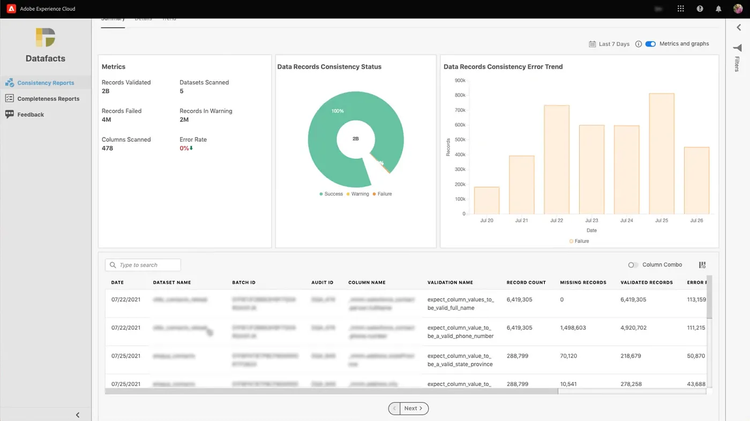
When we introduced Adobe Developer App Builder last year, we highlighted the advantages of this complete framework for building cloud native apps hosted on Adobe’s architecture. Enterprise developers need to customize Adobe Experience Cloud and Adobe Experience Platform for their specific business use cases and workflows, and App Builder makes that so much easier.
App Builder enables developers to build custom web apps that extend the functionality of Platform and Experience Cloud solutions. If you’re not familiar, check out this brief article to learn the basics, or this deep dive video for more details.
The power and flexibility of App Builder were on full display recently when Softcrylic, an Adobe Solution Partner, demonstrated their Datafacts App Builder application. Sundar Sritharan is Senior Director, Software Development and Testing at Softcrylic and the engineering lead for their Datafacts App Builder application. He told us several of their clients are customers of Adobe Experience Platform who wanted a better way to validate their Platform data and to ensure efficient data de-duplication. Helping customers with data consistency and validity are the two main features of Datafacts.
Sundar was kind enough to share his team’s experience working with both App Builder and Adobe Experience Platform. Here are just a few highlights he and his team called out.
Datafacts, App Builder, and Adobe Experience Platform — Top 5 Highlights
Documentation - “The documentation for setting up an App Builder project and development environment was well written. We found it easy to follow and straightforward to get up and running with a test project. The on-boarding process documentation was also great — well written and easy to use. The Platform API reference documentation was very good, with a handy Postman collection for API testing and validation too.”
Technical Support - “The tech support team is awesome. The responses we got were so quick, intelligent, and honest. Instead of telling us what they thought we wanted to hear, they told us what we needed in order to move forward.”
Managed Infrastructure - “Having a managed infrastructure available from Adobe is a really good thing for developers, so we don’t have to manage our own servers for storage or hosting. We were able to create and manage our projects with access to the tools and APIs we needed.”
Adobe I/O - “Adobe I/O is comprehensive for access to APIs, real-time events, and Runtime functions. The Developer Console gives us one place for managing projects, assigning credentials, viewing analytics, and accessing APIs.”
Data Science Workspace - “Our Datafacts application uses Data Science Workspace in Platform extensively, using machine learning and artificial intelligence for insights from the data. The platform SDK for Python was very helpful here as it wraps many API references in it with practical conveniences.”
-------------------
While Sundar and his team called out these highlights, they did have a few design challenges during the application development process. Since Datafacts is a highly data-intensive application, managing data access requests to Platform Query Service presented some technical challenges, specifically around constructing the queries, deciding on caching strategies, and displaying query results with the react-spectrum front end. Each of these took some time to develop and optimize. In the end, the team was able to engineer solutions to each of these challenges to make Datafacts both functional and highly performant.
To learn more about App Builder for building a custom cloud native application in Adobe Experience Cloud, sign up for the developer preview here. Learn how Adobe Experience Platform can put your data to work here. And to see the Softcrylic Datafacts application in action, check out their demo :