Creative Cloud Plugin Marketplace Updates for Developers
Reply to reviews and add videos to your listing in our new experience.

Editor’s Note: “Welcome Avanish Gandhi, a Senior Product Manager at Adobe to the Tech Blog! Avanish manages Marketplace and plugin developers Distribution experiences for plugins and add-ons for Adobe’s Creative Cloud suite of products.”
— Erin Finnegan, Community Engineer, Creative Cloud.
The Adobe Creative Cloud Extensibility team is proud to introduce big improvements to our Plugins Marketplace, which can be accessed from the Adobe Exchange and the Marketplace tab on the Creative Cloud desktop app. The following new features and enhancements are in direct response to requests from our developer community.
This article is intended for plugin developers and anyone else who has a listing on the Exchange and Creative Cloud Desktop Plugin marketplace.
Updates to the Plugins Marketplace in the Creative Cloud desktop app
The Creative Cloud desktop app version 5.9 is rolling out to users by the end of September and contains the following updates and enhancements to the Plugins Marketplace:
- Ratings and Reviews now work for both ZXP (used for packaging CEP, C++, and other content types) and UXP plugins (.CCX or .XDX files) with Creative Cloud desktop app version 5.9:
- Users can now view or leave Ratings and Reviews on the Creative Cloud desktop app Marketplace and on the Exchange website.
- Developers can reply to reviews for their listed plugins on either surface, for both UXP and ZXP listings.
- The search experiences have been improved and consolidated for both UXP and ZXP listings.
- We have improved filter and sort features.
- Previously, category filters such as “Collaboration” or “Tools & Automation” were only available for UXP plugins. Now you can filter by category across all plugin types.
- We redesigned the Plugin detail page experiences for both UXP and ZXP plugins to make the acquisition of plugins easier for users. The new design includes the following:
- A “What’s new” section that highlights updates from developers for the latest version of the plugins
- Video support: We added the ability to feature Marketing and How to videos for both types of plugins.
- New Ratings and Reviews for all types of plugins ( with the reply to reviews feature for developers and entitled users )
- A new developer profile page: Now plugin users will be able to find all the available plugins listed by the developer of the plugin.
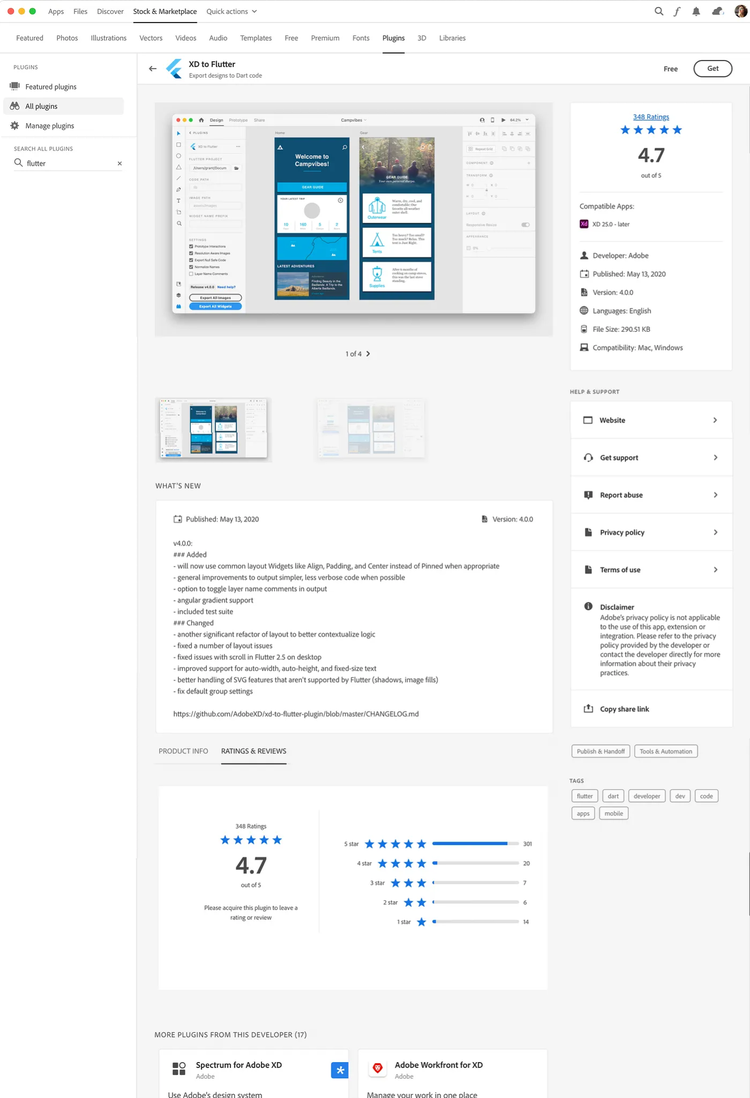
A redesigned Exchange experience on the web
We’re also excited to announce the launch of our redesigned Plugin Marketplace experience on the Adobe Exchange! This redesign modernizes the overall experience, aligning it with our Creative Cloud desktop app marketplace experience, and comes with the following enhancements:
- Developers can now reply to Reviews
- We have improved and consolidated the search experience to include both UXP and ZXP results in a single search.
- We’ve replaced the “My Exchange” page with a new “Manage” page that allows a user to know what was previously acquired plus a link to install it using the Creative Cloud desktop app.
- We created a new Plugin detail page experience for UXP Plugins in order to make the acquisition of plugins easier for users.
- Similar to the desktop app experience, we added a new Publisher Profile page where plugin users will be able to find all the available plugins listed by the developer of a plugin.
A new place to reply to reviews
Plugin developers who have listed their plugins on the Plugin Marketplace will be able to respond to user reviews for their plugins, either directly on plugin detail pages on the Exchange or in the Creative Cloud desktop app.
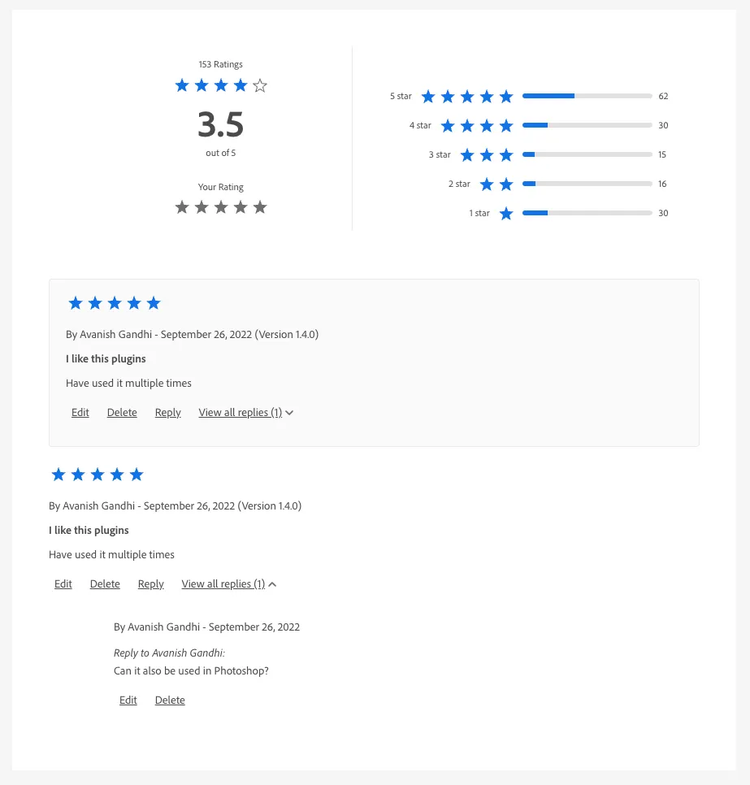
How to respond to reviews
Previously, developers could respond to reviews using the Partner Portal at https://partners.adobe.com/exchangeprogram/creativecloud. As of September 15th, 2022, this process has changed.
Here are the steps to respond to a review after September 15th:
- Navigate to a plugin detail page of a plugin you acquired/purchased in the Exchange marketplace http://exchange.adobe.com/creativecloud. (This link is also provided in the ZXP Submission Portal, where you previously replied to ZXP reviews).
- Log in to the Exchange marketplace website using the same Adobe ID which you use to log in to Partner Portal, https://partners.adobe.com/exchangeprogram/creativecloud.
- Navigate to the “Ratings & Reviews” section of the plugin detail page and find the review that needs to be responded to.
- Reply to the review and click submit.
Alternatively, you can reply to the reviews in the Creative Cloud desktop app Marketplace after the release of Creative Cloud desktop app version 5.9. (Here’s how to update your Creative Cloud desktop app if it doesn’t update automatically.)
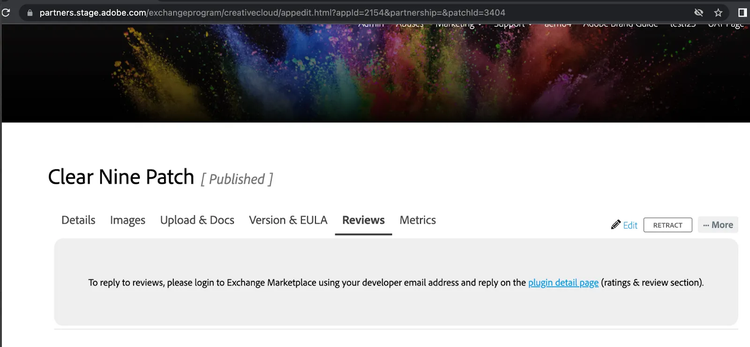
The Partner Portal provides a link to the Exchange Marketplace listing where developers can reply to reviews:
Let us know what you think!
Be sure to check out all the new existing updates to Exchange Plugin Marketplace at http://exchange.adobe.com/creativecloud and in the Creative Cloud desktop app Plugin Marketplace. Let us know what you think in the forum. If you find a bug or have a feature request, let us know!
For more stories like this, subscribe to our Creative Cloud Developer Newsletter.