Debugging Your AEM Dispatcher Configuration
Earlier this year, Adobe Consulting released an easy-to-use Dispatcher in a Docker Container. This is an excellent opportunity for developers to learn how it works.
When it comes to debugging the Dispatcher configuration, your options are limited: The documentation is fragmented, and the code is closed source.
This leaves us with two options:
Introspection — interpreting what you find in the logfiles.
Experimentation and observation in a controlled environment.
Reading logfiles does not a huge amount from my side — except “set the log level to ‘trace’ and read carefully”. So, in this article, I want to focus mainly on the latter, the “experimentation” approach.
Controlling the environment
| Clearly, you don’t want to observe behavior in production: There is too much noise, and too many uncontrollable factors (other requests and activations modifying the cache).
The first step is to download and build a local Dispatcher — Docker . You can apply your custom configuration — or start with the we-retail example (included in the Docker container).
I also recommend using an HTTP proxy (e.g., Charles) with your browser. This gives you the opportunity to replay individual requests in isolation. Large pages sometimes consist of dozens of requests which creates a lot of noise. Plus: Hitting “Reload” in the Browser does not do what you think — more on that further down.
My second recommendation is to use Firefox: When you configure a proxy in Chrome, this alters the HTTP proxy settings for the whole system and other applications will create noise.
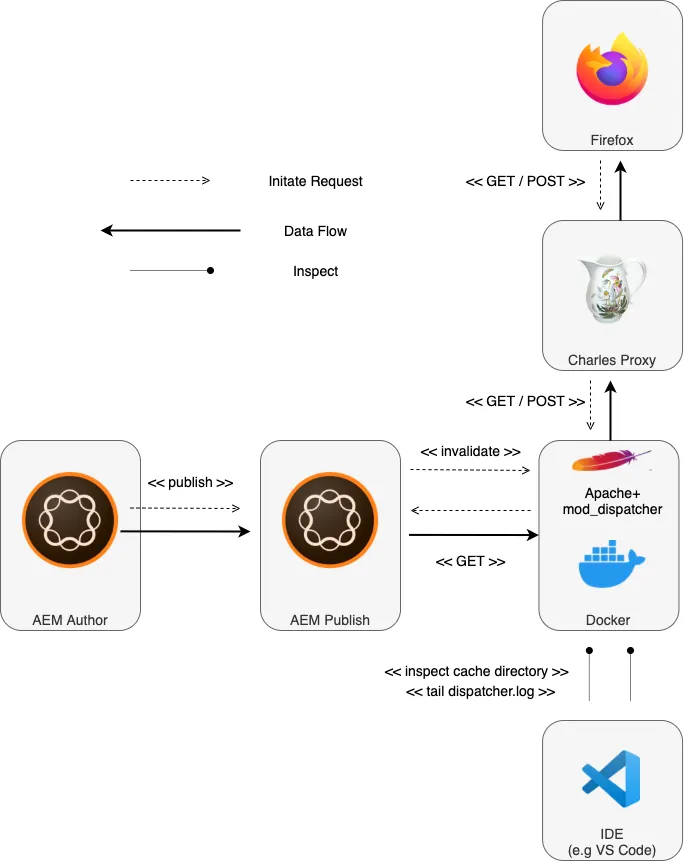
Basic controlled debugging environment
With this setup we already can run controlled experiments. We can
- run request in isolation (not whole pages)
- manipulate the request like headers or URLs
- check different timing (indicate cached or non-cached responses)
- check the files in the cache directory
- tail logfiles
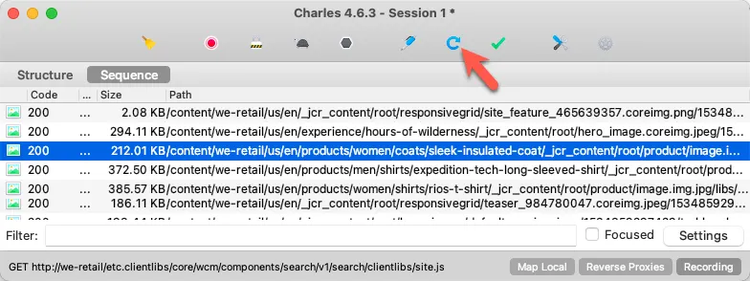
Replaying individual requests with Charles
Observing status
We need one more tool in your toolchain. So far, we only observe the behavior — data in transit — if you will. I found it quite insightful, to trace the cache directory while conducting experiments. Let’s also monitor how the Dispatcher stores its status, the data at rest.
Three Unix tools help observe the status:
- stat — get modified dates
- tree — display file hierarchy
- watch — continuously watch the filesystem as it changes
If you have mounted the cache directory from the host, you can observe directly on the host. If you are running Windows, you might prefer to log in to the docker container and run the commands from within.
#1 Log in the container with a bash shell
#2 Change to a cache sub-directory you want to observe (the whole directory is too long to fit on one screen)
#3 Print the .stat file with its last modified date and the tree from the current directory tree. Keep watching and repeat every second. Display also the dates to compare with the date of the statfile (remember, that by default, .html files older than .stat are considered stale; refer to the Tutorial)
$ docker exec -it mydispatcher /bin/bash #1
(container) $ cd /mnt/var/www/html/content/we-retail/us/en/products/men/coats #2
(container) $ watch -n1 "stat -c \"%n - %y\" /mnt/var/www/html/.stat && tree -D" #3
Observing behavior
The above setup already is great experimentation platform for the frontend of the HTTP chain. I.e., you can see that the statfile’s modified date changes when you publish. Resources are deleted and stale files are refreshed — as you can tell by their modified dates (see -> Tutorial)
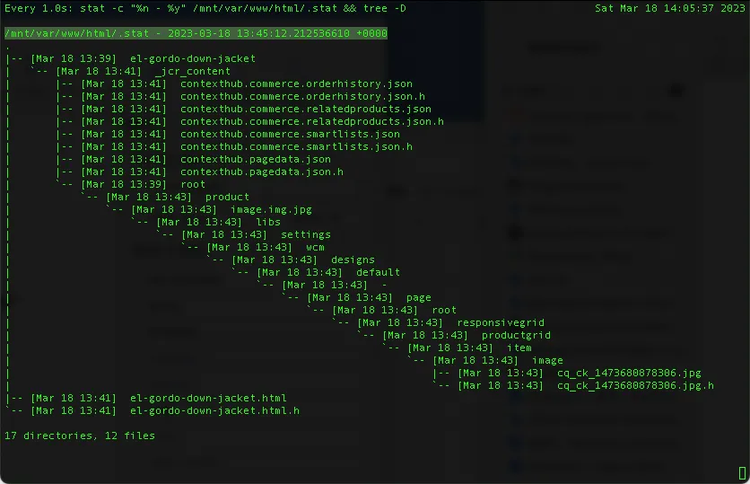
Watching the cache tree in motion
But let’s be honest: Fetching data is the easy part of caching. The more complicated part is the invalidation. And at that end, we are still a bit blind.
And now comes the interesting part: The conversation between AEM Publish and Dispatcher is also based on HTTP. So, why not put a proxy in between here as well?
Full observable lab setup
Why not indeed? Let’s go for it. We augment our lab to look more like this :
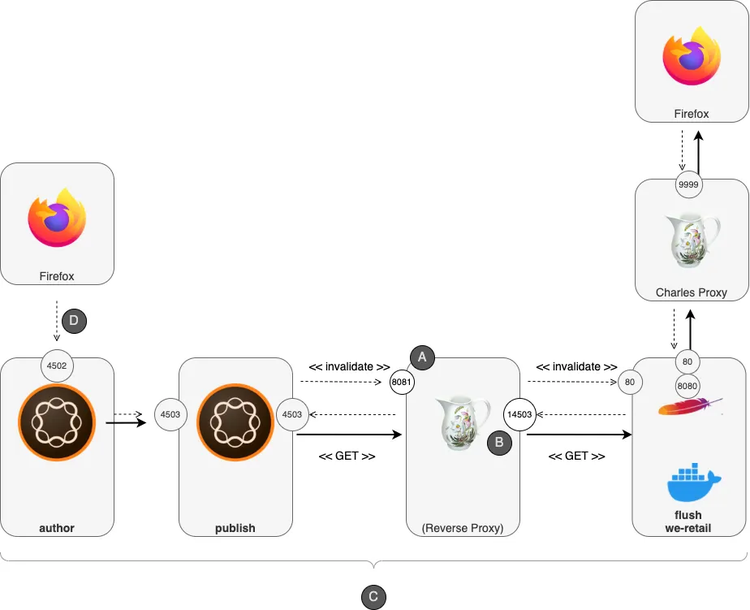
Full-blown Dispatcher lab setup
Here, we have configured the proxy to act as a reverse proxy in between Publish and dispatcher. Dispatcher and Publish communicate on two channels, so we have to configure endpoints for the reverse proxy — and re-route the requests.
(A) AEM Publish is configured to send invalidation requests to port 8081. Charles will pass on these requests to port 80 (where dispatcher-docker actually is running)
(B) We configure the default Publish farm port to port 1453, where Charles provides another endpoint. This endpoint is passed to the Publish system listening on port 4503.
(C) We are also using a set of hostnames to keep track of the connection. The IP addresses all map to 127.0.0.1 — but naming things helps keeping them maintainable.
(D) Using the hostname author for the Author, allows us to exclude the traffic between browser and Author from being proxied.
With this setup you can also see what information the Publish system sends to the Dispatcher and what requests the Dispatcher can answer from its cache and what requests it passes on to the publish farm for re-rendering.
This is a bit fiddly, especially if you do not keep track of the port numbers. I’d recommend using a diagram like the one above for some cognitive support.
You can scroll down for a step-by-step instruction… Or you stay with me for a few examples to get a taste of what insights you can gather.
Random observations
Below you’ll find a few random observations I made while playing with the setup. This should not replace a full documentation but should make you curious to conduct your own experiments.
Statfiles 1/2
Open a few top-stories from the we-retail page:

Check how it looks in the Dispatcher’s cache folder. .stat is older than the cached .html files — they are considered fresh:
$ cd .../cache/content/we-retail/language-masters/en/experience
$ ls -al ../.stat
-rw-r--r--  1 koch  staff  0 Mar 19 14:27 ../.stat

ls -al
total 144
drwxr-xr-x  12 koch  staff    384 Mar 19 14:33 .
drwxr-xr-x   9 koch  staff    288 Mar 19 13:55 ..
drwxr-xr-x   3 koch  staff     96 Mar 19 14:33 arctic-surfing-in-lofoten
-rw-r--r--   1 koch  staff  34474 Mar 19 14:33 arctic-surfing-in-lofoten.html
drwxr-xr-x   3 koch  staff     96 Mar 19 13:40 fly-fishing-the-amazon
-rw-r--r--   1 koch  staff  25942 Mar 19 13:40 fly-fishing-the-amazon.html
                                        ^^^^^
                               Keep an eye on the dates
Now let's publish the “Lofoten” page and revisit the files. Unsurprisingly, the arctic-surfing-in-lofoten.html has been purged — and the statfile was updated.
$ ls -al ../.stat
-rw-r--r--  1 koch  staff  0 Mar 19 14:34 ../.stat

$ ls -al
total 64
drwxr-xr-x  10 koch  staff    320 Mar 19 14:34 .
drwxr-xr-x   9 koch  staff    288 Mar 19 13:55 ..
drwxr-xr-x   2 koch  staff     64 Mar 19 14:34 arctic-surfing-in-lofoten
drwxr-xr-x   3 koch  staff     96 Mar 19 13:40 fly-fishing-the-amazon
-rw-r--r--   1 koch  staff  25942 Mar 19 13:40 fly-fishing-the-amazon.html
                                        ^^^^^
Now, let’s reload the “Fly fishing” page in the browser and look in the file system. fly-fishing-the-amazon.html was older than .stat and thus re-rendered. You can see that at the newer date — which now is younger than .stat:
$ ls -al
total 64
drwxr-xr-x  10 koch  staff    320 Mar 19 14:34 .
drwxr-xr-x   9 koch  staff    288 Mar 19 13:55 ..
drwxr-xr-x   2 koch  staff     64 Mar 19 14:34 arctic-surfing-in-lofoten
drwxr-xr-x   3 koch  staff     96 Mar 19 13:40 fly-fishing-the-amazon
-rw-r--r--   1 koch  staff  25942 Mar 19 14:34 fly-fishing-the-amazon.html
                                        ^^^^^
And of course, you will see the request in the proxy between Dispatcher and Publish:
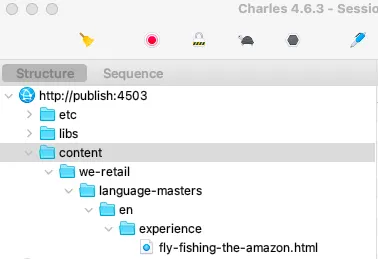
Statfiles 2/2
I sometimes forget how the Dispatcher counts the levels for the statfiles. Let’s invalidate some page and see what the cache folder looks like:
# invalidate:
# /content/we-retail/language-masters/en/experience/fly-fishing-the-amazon

$ find . -name .stat -exec ls -al {} \;
-rw-r--r--  1 koch  staff  0 Mar 19 13:29 ./content/we-retail/language-masters/en/.stat
-rw-r--r--  1 koch  staff  0 Mar 19 13:29 ./content/we-retail/language-masters/.stat
-rw-r--r--  1 koch  staff  0 Mar 19 13:29 ./content/we-retail/.stat
-rw-r--r--  1 koch  staff  0 Mar 19 13:29 ./content/.stat
-rw-r--r--  1 koch  staff  0 Mar 19 13:29 ./.stat
#       cache/content/we-retail/language-masters/en
#                                               ^^^
# level   0     1        2           3           4
Counting unsurprisingly starts with 0 at the cache root. Don’t be confused that when the level is 4, the Dispatcher also places statfiles on levels 0–3. These are not relevant for checking freshness of deeper files.
Deleting resources
Let’s activate a we-retail root page:
$ cd ... /cache/content/we-retail/language-masters

# BEFORE

$ ls
en        en.html   en.html.h

$ ls en
_jcr_content    about-us        about-us.html   about-us.html.h experience      products
# invalidate:
# /content/we-retail/language-masters/en

# AFTER

$ ls
en

ls en
about-us        about-us.html   about-us.html.h experience      products
Invalidating a resource not only purges the primary file (en.html) but also its _jcr_content node from the cache. But it leaves all sub-resources in touched. This is what you’d expect.
Experience fragments
Let’s set up some dependencies and see how the setup behaves.
- Create simple Experience Fragment (XF), e.g.,
…/experience-fragments/we-retail-experience-fragment - Use the XF on some page in the language master, e.g.,
…/we-retail/language-masters/en/experience/arctic-surfing-in-lofoten - Roll out the master to ca
- Publish the XF:
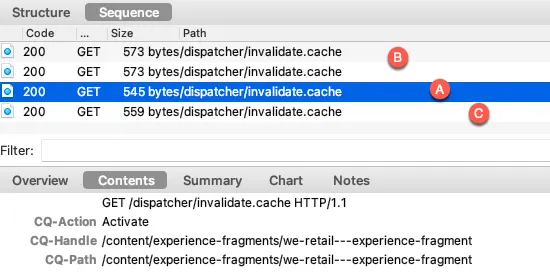
AEM detects the dependencies from the XF You’ll see multiple resources being activated:
# AEM generates invalidation requests for:

/content/we-retail/ca/en/experience/arctic-surfing-in-lofoten
/content/we-retail/language-masters/en/experience/arctic-surfing-in-lofoten
/content/experience-fragments/we-retail-experience-fragment/master
/content/experience-fragments/we-retail-experience-fragment
I encourage you to play around with dependency detection to get a feeling for it. It might not work at once: Note, that AEM also checks the dates, i.e. when the page is younger than the XF published, there is no need to invalidate.
Browser reloads
If you normally surf a webpage, the browser will request a page like so:
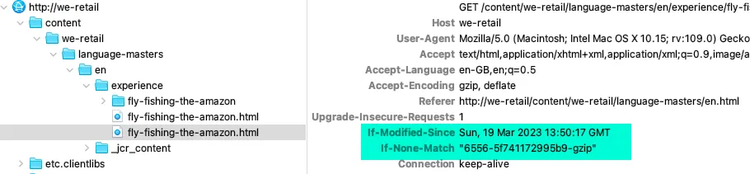
But if you hit “reload” on a page, the browser sends some extra headers, that tell the Dispatcher to deliver a fresh page:
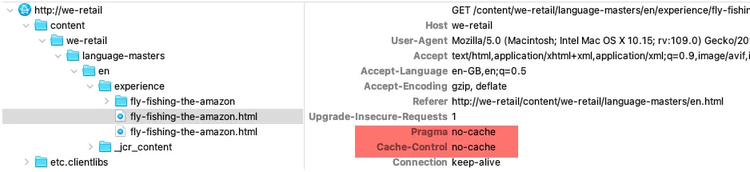
Under some circumstances, no-cache headers in the request could circumvent the cache. So I like to keep an eye on the conversation between Dispatcher and Publish and make sure this does not happen. (It does not in the AMS default configuration — phew)
Step by step instructions
I hope I could make you a bit curious. And if you want to set up your own Dispatcher lab, here is a quick step-by-step installation guide.
0. Install Dispatcher / Docker
- Install Docker
- Download and build a local Dispatcher — Docker image and start a container according to the Readme.md.
1. Define hostnames
Add the hostnames to your /etc/hosts file:
127.0.0.1 flush
127.0.0.1 author
127.0.0.1 publish
127.0.0.1 we-retail
2. Configure publication agent
Configure the publication agent on Author:
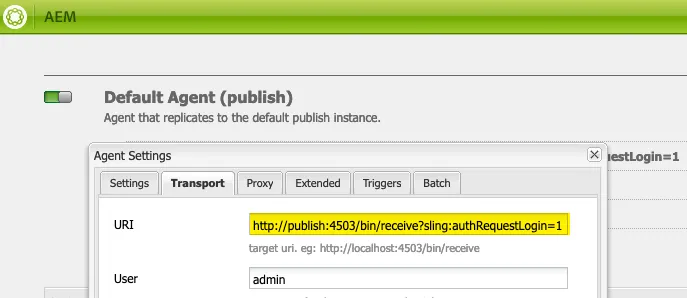
Transport/URI = http://publish:4503/bin/receive?sling:authRequestLogin=1
3. Disable Author flush
Disable the flush agent on the Author
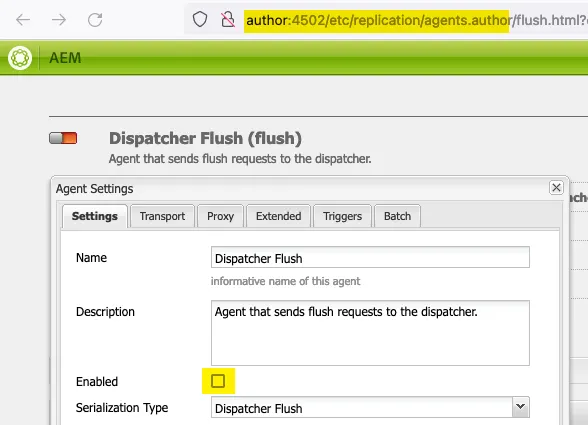
Settings/Enabled = false
4. Configure invalidation agent
Configure the invalidation agent for Publish (NOTE: we are still on the Author system).
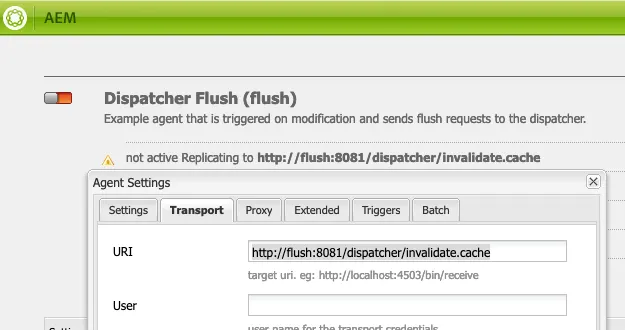
Settings/Enabled = true
Transport/URI = http://flush:8081/dispatcher/invalidate.cache
5. Activate invalidation agent
Activate the invalidation agent for Publish using tree activation on Author. This makes the changes available on Publish without having to log-in to publish. This also distributes the settings to multiple publish systems when configured.
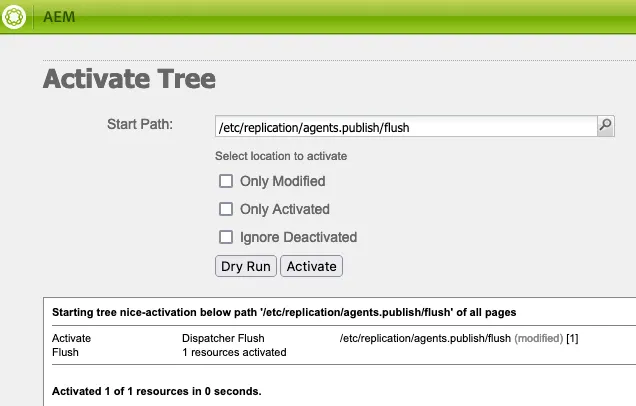
Start Path: /etc/replication/agents.publish/flush
6. Set up reverse proxy
Set up Charles as reverse proxy for ports 14503 and 8081.
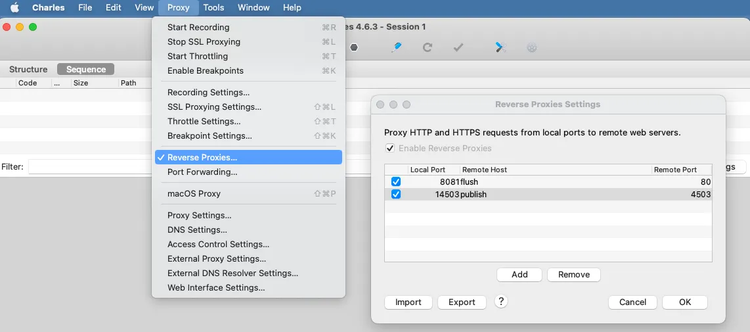
7. Configure the Dispatcher
In /scripts/env.sh, change the Publish port to 14503:
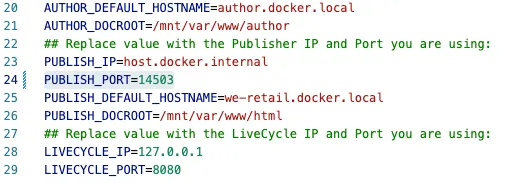
8. Set up Firefox
In Firefox, exclude traffic for author from being proxied:
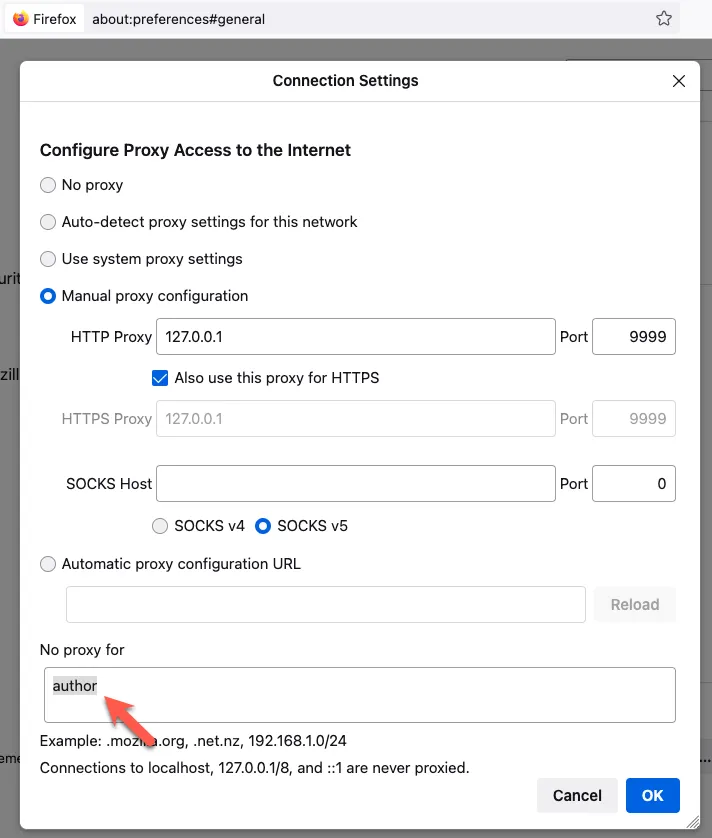
9. Test invalidation
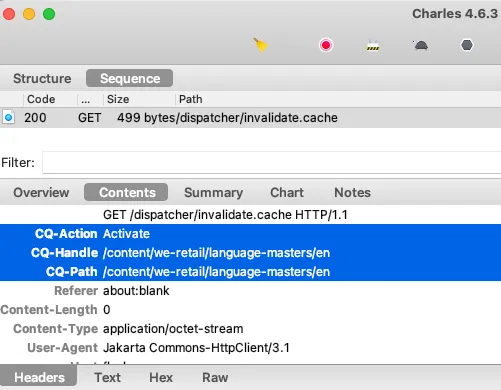
Activate some page on the author. You should see the request pop up in the proxy:
10. Test resource requests
Check if resource requests are logged in the proxy:
(1) Clean the cache directory:
$ cd cache
$ rm -Rf *
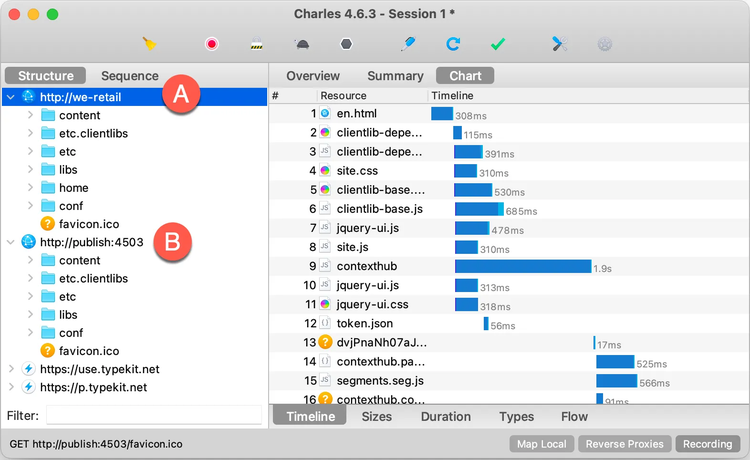
(2) Request a page via the we-retail domain. In the proxy you should see each request twice:
(A) As captured between browser and dispatcher and
(B) between the Dispatcher and Publish.
Outlook
With this setup, we can get a good feeling how AEM behaves with individual requests and invalidations. In one of the following articles, I’ll show you how the Dispatcher behaves with multiple requests in parallel. Spoiler: We will use the same setup but put some load on the system using jMeter.
Stay tuned.
-achim