AEM Dispatcher — Create the Perfect Caching Architecture

Created with Adobe Firefly
A few thoughts on why developers should think about caching as a vital part of application design…
AEM is a powerful and versatile framework for building content applications. It can be used to power everything from static websites over customer portals to single page applications.
Usually, AEM is used on platforms for massive audiences. It’s no secret that web applications perform best and scale when content is cached. AEM is no exception. That’s what the AEM Dispatcher is used for nowadays: Caching — despite its name.
(The last time I saw a Dispatcher setup to dispatch requests to multiple Publish servers was over ten years ago)
Given the broad variety of different applications, there obviously is no single “best practice”, and there are no one-size-fits all configurations.
But sadly, the dispatcher- and caching configuration is often left as an afterthought to system administrators.
| Caching must be an integral part of the application design not an afterthought
If you follow me, you know: Caching must be an integral part of the application design, and thus must be defined by the AEM architect and considered by the developers when implementing the components.
Again, there is no one-size-fits all. But there are a small number of principles that help in designing the AEM application for optimal caching. To choose the proper mix of strategies, however, we need to know a little bit about our application. We need to:
- know which content is public / protected / restricted / private
- know which content can be shared
- identify content dependencies and invalidation domains
- know the request distribution pattern
- understand the business requirements
Let’s dive into the topics…
Content privacy
We distinguish between several types of content:
Public — Each user can access the content. No login required.
Segmented — Users don’t have to log in, but they are identified as a certain type of user when entering the page (eg. healthcare “professional” or “patient”, “EU Customer” or “US customer”, etc...)
Restricted — The user must log in first. They can then access certain types of content that has been shared with groups they are members of.
Protected — All users can access all content after they have logged into the system. This is a special form of “restricted”: Restricted to all users.
Private — User-specific content, such as login data, profile data, private messages, etc.
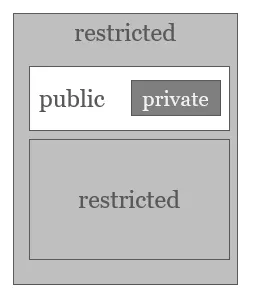
Mixing different types of content on a single page
You can mix different types of content on a single page, but you must be careful if and how you cache in the Dispatcher. The Dispatcher stores rendered resources in in its file system and without further measures, everyone with the proper URL will have access to the file.
We further differentiate if:
- content is accessed at page level (ie. the page is restricted) or
- content is mixed in at component level (ie. restricted area on a public page)
We can then apply the following recipes (in combination):
- Partitioning
- Permission sensitive caching
- Partial disabling
- Sling Dynamic Includes or Apache’s mod_include
- AJAX & conditional lazy loading
Segmented content
Pages: If the audience is segmented, consider segmenting / partitioning the content, too. For example, you could have one content tree for a “patients” audience and one for “healthcare professionals”. If there is overlap between the two, share the overlapped content with Content Fragments / Experience Fragments or with a live-copy from a common master.
This only works when the audience can be segmented discretely without overlapping (ie. no user is in two segments).
Components: AEM doesn’t just provide access to entire pages. The underlying SLING framework lets you access resources at any level — including components. For example, you can access and render a component header on a page home by its jcr:content path:
/content/brand-a/en/home/jcr:content/main/header.html
We can use this feature when only parts of the common pages should be segmented.
Maintain the customers audience segment as a cookie (or in the context hub) and lazy load via Ajax the segment-specific section using a custom-built component wrapper. This wrapper would be calling the components jcr:content path.
Something similar can be achieved with mod_include. In that case you need to configure to translate the cookie information into a static URL that can be served by AEM in the background. This is a bit tricky — so I advise you to start with implementing in JavaScript first.
Protected and restricted content
Protected and restricted content both use the same feature: Permission sensitive caching (PSC).
The Dispatcher caches the resource on its local disk. But when a user tries to access that content, the Dispatcher sends a “HEAD” request including the client credentials to the Publish system. The publish system checks the credentials and either returns a 200 “OK” or 403 “Forbidden”. The Dispatcher delivers the content based on that result. This requires an additional HTTP hop to Publish, but the more expensive re-rendering can be skipped.
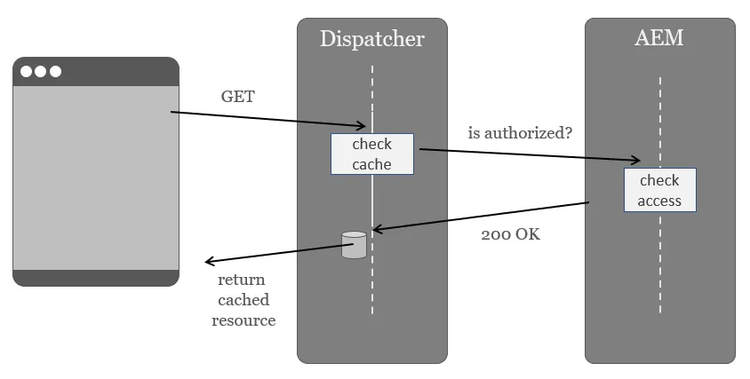
Permission sensitive caching
Note, the resource to be rendered always is the same and identified by its URL. AEM only decides whether to deliver or not.
| AEM must always return the same contents at the same URL
AEM must always return the same contents at the same URL. Do not render different contents when evaluating groups or other log in data.
Permission sensitive caching can easily be augmented. AEM will always take care of authorisation. But you don’t have to rely on AEM doing the authentication — you can use (almost) any identity provider of your choice. See Daniel Klco’s article for an example on how to combine this with SAML authentication.
Pages: Authorisation page access is a straightforward implementation of the PSC pattern as described above.
Components: Again, fire an AJAX request from within the page. If you require permission sensitive caching for more than one component, create a component wrapper or servlet filter do handle the lazy loading. Do not hardcode the functionality in each component.
Private content
Private content is personal data for the logged-in individual. Caching for this type of content must be disabled: The Dispatcher is a shared cache.
It only makes sense to cache data that is accessed by more than one person. You can disable caching based on paths and based on HTTP response headers. Using paths is more secure. You can validate by checking on the Dispatcher that the corresponding folder always is empty. When mixing private and public content in the same folder, mark some as non-cacheable, then configuration errors are not that obvious.
Pages: Content pages or resources are rarely private. Personal data usually comes from 3rd party systems that are integrated into AEM.
Imagine you have 100.000 known customers and 6 Publish systems. Now imagine the trouble you’d have to maintain individual resources in CRX for so many customers and keep them in synch on all Publish nodes…
Frankly, AEM is not suited to store this type of data. Theoretically you could use AEM in that scenario — you would then disable caching for these resources (and keep them in a separate tree apart from public content). But in my 18-year-long AEM career I have only encountered this use case once.
Components: It’s more common to integrate small pieces of personal data on pages that otherwise are public, such as the login box or a personal welcome notification. In such cases, the content will be provided by specialized frontend components that are making calls to some 3rd party systems.
I personally prefer it when these components communicate with the services directly. When they are hosted on different domains, make sure to set up appropriate CORS parameters. Alternatively, you can use the Dispatcher as a split proxy to pass requests to the 3rd party services.
(Note: This is not applicable in AEMaaCS).
If you have a CDN, you can use the CDN as split proxy. You should use AEM as split proxy or application gateway only as last resort. AEM is slower compared to a pure proxy and more expensive to scale out — both license-wise and maintenance-wise.
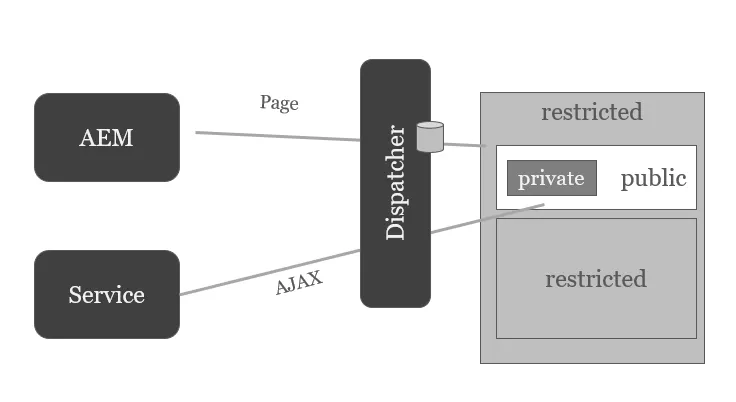
Mixing private content into a public page
Shared content
Shared content is content that is shared between multiple pages. Take the header and footer as the most prominent examples.
Believe it or not, when you use Experience Fragments (XF), the XF’s markup is re-rendered on each single page that uses that XF. This is not a big deal on brochure-ware sites where content is rarely added or changed. But if you have a larger body of pages, changing one page will invalidate all other pages, too: If you have 1,000 page this means the same XF needs to be re-rendered 1,000 times anew.
Luckily, there is a simple remedy: You can wrap the XFs with a Sling Dynamic Include (SDI). This will give the XFs individual URLs. They won’t be re-rendered in the context of each page. The page will render a placeholder. The XF will be rendered only once under a dedicated URL and the Dispatcher will “merge” the page and the XF together on the fly.
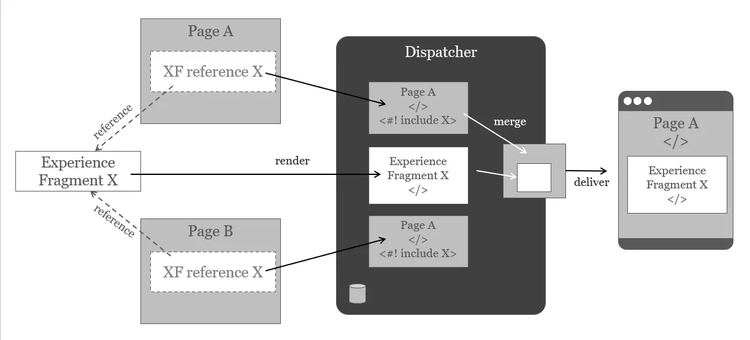
Using Apache “include” directive to merge shared content
Note: You have have to wrap the Experience Fragment, not the component using it.
Identify content dependencies and invalidation domains
When you render a page P and P — during rendering — draws content from other pages Q and R and from Experience Fragments X and Y, the P is dependent of Q, R, X and Y. If either of these pages change and is published, then P needs to be invalidated, too.
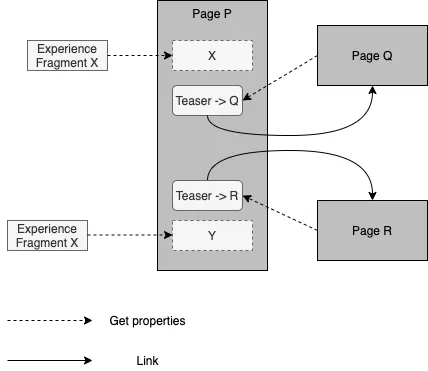
Page P has render dependencies on Fragments X, Y and on pages Q, R
Typical dependencies occur when a page pulls data from the target page to generate link lists or teasers. Pages are also dependent on the Experience Fragments (XF) they use.
AEM’s predecessor (Day Communiqué) tried to keep track of all the dependencies to be able to invalidate only parts of the dependency graph. It turned out, however, that dependency tracking is quite expensive and error prone. Invalidating in bulk and re-generating on demand when content is requested can be cheaper and more reliable.
Usually, only HTML content is dependent on other resources. To deliver images, you only require the images’ resources.
So, when you publish a resource below /content/… usually all HTML pages are invalidated, because they could potentially depend on that resource.
Now, if you have only one website with only a couple of hundred pages, this is not a big deal. But invalidating thousands of pages on a multi-site platform is expensive. (Or rather regeneration afterwards will be expensive)
When you think about it… you can be sure that the sites…
/content/brand-a/en
/content/brand-a/de
/content/brand-b/en
/content/brand-b/fr
/content/investor-relations/en
…don’t have any interdependencies. So, there is no point in invalidating Brand A when there is a change in Brand B.
We can also define invalidation domains. How?
By using the /statfileslevel directive in the Dispatcher. In this case, you would set the /statfileslevel file to “2”. This means that resources below that level are not dependent on each other. Publication in one subtree won’t auto-invalidate the neighboring subtrees.
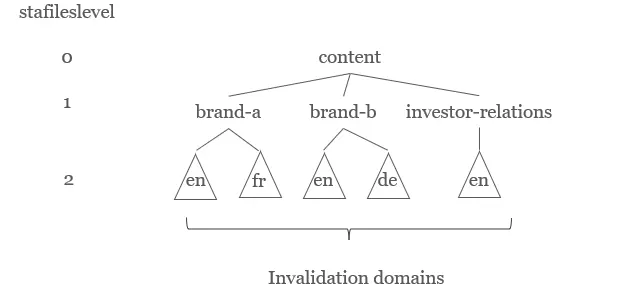
Invalidation domains
Setting the level to “1" would mean, that when a page /content/brand-a/…/P is changed, all subtrees at that level are invalidated too (ie. brand-a/en and brand-a/fr). If en and fr are independent, then “1” would over-invalidate.
Setting the level to “3” would mean that potential dependencies between /content/brand-a/en/P and /content/brand-a/en/Q would be ignored. The invalidation scope is too narrow.
The feature — or culprit, depending on how you put it — causing the invalidation of large domains is the auto-invalidation feature in the Dispatcher. If you have mildly-nested sites and you do not want to use auto-invalidation, you have several options:
- Use TTL-based invalidation instead of event-based invalidation. You can use only TTL-based or auto-invalidation. If you define both, TTL always wins. For example, even if you define all HTML-pages below the defined statfiles level to be auto-invalidated, they will be served from cache until their TTL is reached. This only applies to the auto-invalidated resources. Pages that are published are always physically deleted from cache and these pages do not have to wait for their TTL to expire.
- Use a TTL-based CDN on top of event-based auto-invalidation to “dampen” the re-generation of pages. If pages survive the auto invalidation with a certain rest-TTL in the CDN, they don’t have to be re-generated all at once. This is useful for larger auto-invalidation domains.
- Break dependencies: You can use Sling Dynamic Includes or similar techniques to ascertain that shared content is not rendered physically in the including page but cached under an individual URL and included in the Dispatcher using mod_include.
Request patterns
Not all pages are requested with equal frequency. The home page and landing pages are visited more often. Individual “deep” pages are not visited as often as the main pages but can make up a significant amount of traffic in total. Often you will see a long tail distribution — but it’s worthwhile to check your specific case.
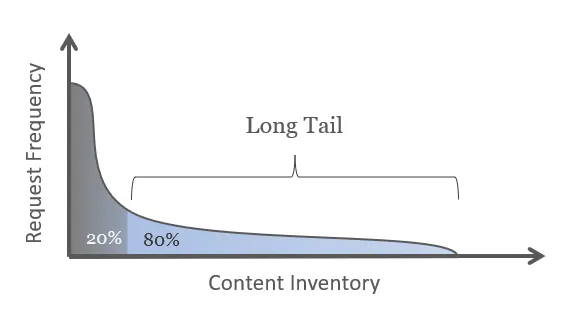
Typical long tail distribution
Knowing the distribution is important: If you have significant traffic in the long tail, TTL-based invalidation is difficult to apply.
Imagine, the typical page at the long tail is requested only once per hour. If you configure a TTL (time-to-live) for 1h, then requests will probably never hit the cache. The resource will probably be invalidated before it is requested a second time.
You could — in theory — assign a longer TTL for deep pages that are rarely changed. But this could confuse the users if they edit a deep page. Editors will get used to seeing instantaneous changes on the “main” pages and suspect an error when they don’t see changes immediately on the long-tail pages.
In such cases, event-based invalidation or a combination of event- and TTL based invalidation can be more intuitive.
Understand the business requirements
This sounds trivial. But I have come across multiple projects that did not have defined business requirements or struggled with unrealistic requirements.
| Pages can be either fast or fresh — or expensive when trying to achieve both.
Caching is always a compromise between freshness and performance.
Pages can be either fast or fresh. Or very(!) expensive. (Unless they are small and trivial).
If you are driving a news-site, you may want your content to be as fresh as possible. But this does not mean you cannot cache at all.
Only the home page, topic hub pages and news tickers need to be updated more frequently. These are the pages that are most likely to change. For a news site it is most important to be able to react to recent events faster than the competition — not apply corrections to typos in real-time.
Articles — once published — can be cached a bit longer. News-articles actually do change
several times after publishing. But changes are not as business critical as the initial publication.
Brochure-ware sites and campaign landing pages for product-centric sites are at the other end of the “freshness” spectrum: They rarely change and can be cached virtually forever.
| Open a dialog with the business stakeholders and negotiate performance requirements.
My advice is to open a dialog with the business stakeholders and negotiate the proper balance for each type of content.
Just asking business stakeholders for requirements could result in unrealistic requirements. Such a requirement could be:
“All content must be visible immediately after publishing and each page must load in under 100ms. Oh yes — and there are 10,000 visitors per hour.”
I could think of an architecture to deliver on these requirements … but the site would not generate the revenue to justify the hosting costs.
Business requirements must contain a business case. How much will I gain? How much can I spend? When will I reach the break-even?
Part of the business requirements also involves considering if and where to cache personal data. Even when you can cache personal data in the browser to increase performance, you might choose not to do so.
When the data contains health information or bank details, you don’t want to risk that data being compromised when the user is using a shared device, or their own devices are stolen or compromised.
Conclusion
I hope I could convince you to plan caching as part of the software architecture, not just in the system architecture. This article was supposed to give you an overview over the topics. If you want to deep-dive a bit more, please read the AEM Dispatcher Cache Tutorial.
If you are interested in more architectural topics, follow me on medium.com@achimkoch.
If you require specific advice on your project, reach out to us at Adobe Professional Services.