Boosting Extensibility of Adobe Commerce with App Builder: Developer Best Practices
How can developers build apps for commerce using Adobe Developer App Builder?
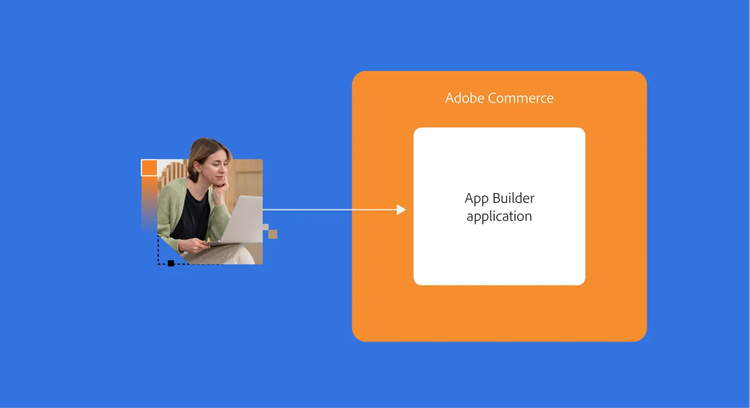
Enterprise businesses often strive to create differentiated customer experiences by expanding functionality through integrations.
While building integrations with third-party systems is often a highly manual and development-intensive process, Adobe Commerce makes it easier than ever with the introduction of Adobe Developer App Builder.
App Builder allows Adobe Commerce customers to use the latest Adobe tools — combined with native Adobe Commerce functionality — to build powerful single-page applications and microservices.
Let’s check out how developers can build apps in App Builder for Commerce.
Choosing the right architecture for the storefront
The application for Commerce can be either headless or headful. The implementation should depend on a set of requirements and answers to the following questions:
- Is this a standalone application with a separate UI?
- Will there be a need to use the application to extend Commerce UI?
In both cases, developers may want to start with an API-first approach to implement the general data synchronization and transition patterns and move toward a headful application later in the development cycle.
App Builder for Adobe Commerce supports headless and headful implementations with built-in UI development capabilities.
Another best practice is to utilize API Mesh as a decoupled API platform. This enables enterprise and mid-market developers to integrate private or third-party APIs and other software interfaces with Adobe products using Adobe I/O. Developers can query the combined sources through a single GraphQL query.
Additionally, App Builder apps with a fully-fledged UI should follow the JAMStack Architecture and can be written either with JavaScript or TypeScript and React Spectrum as Adobe’s front-end framework that applies Adobe’s Design System to React-based components.
Headful application for Adobe Commerce Admin UI
For headful approaches, developers can inject their App Builder application into the Commerce back-office. Depending on the use case, the solution may need authentication.
For these headful applications, the App Builder application can:
- Recognize the current Adobe Commerce user and match it with the Adobe organization user.
- Be executed as a standalone application without breaking the functionality or requiring additional user privileges.
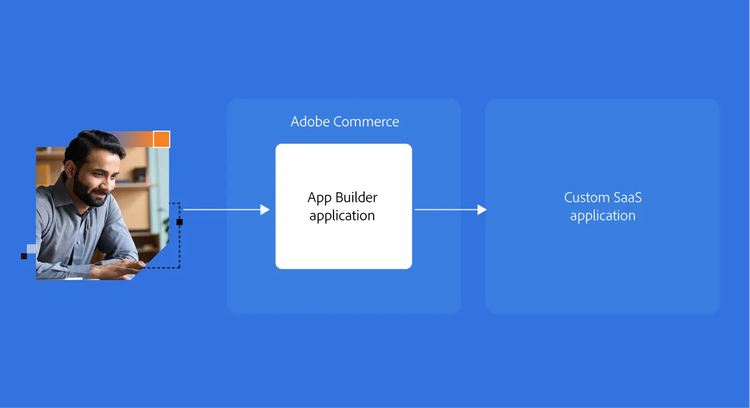
This approach is recommended for Software-as-a-Service solutions (SaaS) where the business logic exists separately from Adobe Commerce and all interactions happen behind the scenes.
Benefits of App Builder
App Builder applications can be used to extend Commerce with minimal to no changes to the Adobe Commerce codebase. As a result, App Builder provides an array of useful benefits:
- Composability — An App Builder application can be used to orchestrate the API from Adobe Commerce and 3rd party services to power the storefront. Services can easily be added, upgraded, or replaced with minimal impact to the entire commerce application.
- Maintainability — An App Builder application can be maintained separately from the Commerce application, with separate release and deployment procedures. It is possible to introduce the “feature flags” concept for A/B testing of the user behavior and introduced changes.
- Upgradability — An App Builder application can be upgraded separately or even replaced, with little to no impact on the Adobe Commerce application.
SaaS connectivity
Modern commerce applications using App Builder might need to transfer data between the application and 3rd-party services. This data can be retrieved from Adobe Commerce, processed using App Builder, and securely sent to the 3rd-party application using a range of specific data and secret management tools built into App Builder.
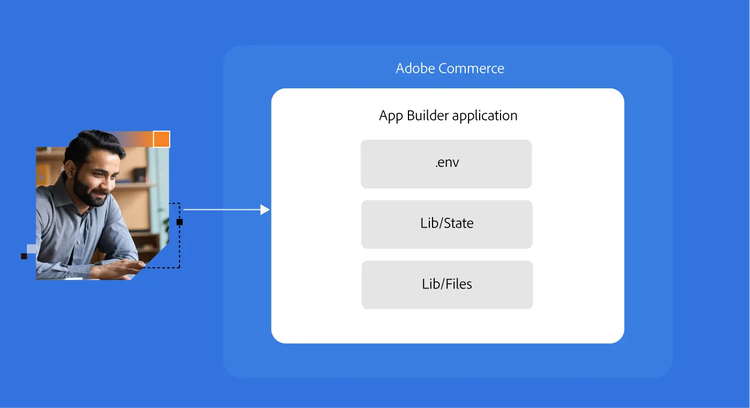
Adobe Developer App Builder allows the storing of secrets as part of its native secret storage mechanism. Additionally, the application behavior can be preserved and restored in long-term storage such as Lib/State and Lib/Files.
These data storage mechanisms allow developers to build applications that can be configured with specific parameters. For example, they can customize how often data needs to be updated in the application or whether the organization needs to obtain some short-lived token.
Application cache
The Lib/State long-term storage can be used for short-term caching scenarios with optional TTL (time to live) parameters. This helps reduce network calls and improve the application’s performance overall.
Separation of responsibility (Decoupling)
The other important and powerful benefit of App Builder applications is that they are decoupled from both Adobe Commerce and SaaS applications.
This offers the ability to track and make proactive changes in a single application, in case either Adobe Commerce or the target application has changes. The changes should be released independently without impact on either of the two applications.
Sending data between Adobe Commerce and App Builder
There are a few ways to send data between Adobe Commerce and App Builder. Let’s review them and their capabilities.
Web API
Adobe Commerce has two powerful Web API mechanisms: REST and GraphQL for two primary use cases:
- GraphQL can be used for customer-specific and public scenarios where all actions are executed on behalf of the customer and require an appropriate customer token. It is a powerful mechanism due to the GraphQL nature and is recommended whenever possible. It also works well with Adobe’s API Mesh.
- REST also supports admin scenarios like creating products and managing inventory. This may be more complex to implement as admin scenarios require separate tokens and must be reissued frequently.
Both GraphQL and REST are pull-scenarios and need to be queried from the App Builder application, either as part of some action. For example, the user presses “Sync products” — or via some recurring mechanism like App Builder Alarms.
Adobe I/O Events for Adobe Commerce
Adobe I/O Events enables building reactive, event-driven applications based on events originating from various Adobe services, such as Creative Cloud, Adobe Experience Manager, and Analytics triggers. This push mechanism can also be used as a trigger for Commerce Applications.
The intent for the App Builder Developer is to be subscribed to — and react to —a specific business event that appears in Commerce. For example:
- Catalog product was created.
- Catalog order was shipped.
- A new customer was created.
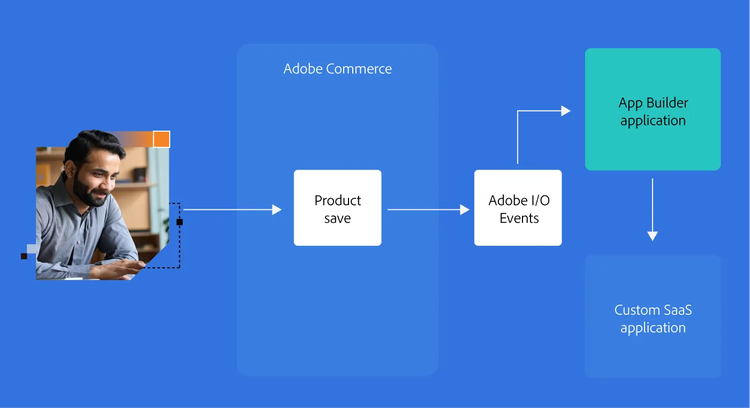
The main benefit is that Adobe I/O Events are delivered to the appropriate App Builder application with a failover mechanism.
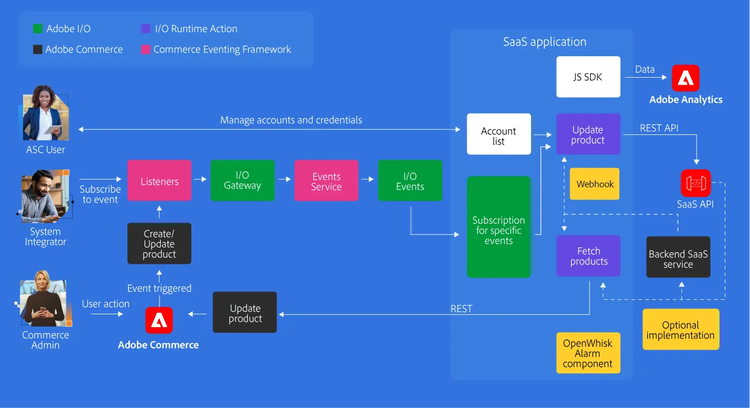
Pulling all the pieces together
In more advanced use cases, multiple mechanisms might need to be used to achieve greater Adobe Commerce extensibility with App Builder.
Authentication patterns
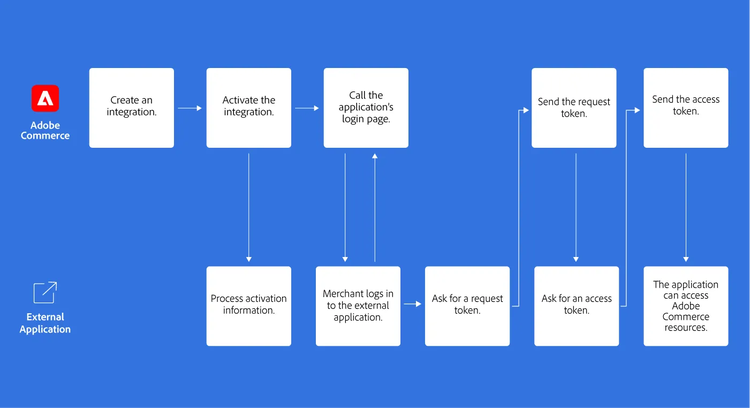
The Adobe Commerce REST authentication can be used as an example of a token exchange mechanism where multiple parties need to be involved:
- Adobe Commerce Admin creates the integration and allows access to specific ACL resources on behalf of this application.
- App Builder application stores and rotates the integration tokens.
- App Builder application exchanges integration tokens for an access token.
- App Builder application provides access tokens for the REST requests.
The more detailed exchange flow from Adobe Commerce guide:
The example of basic implementation (without token rotation) can be found in this GitHub repository.
Conclusion
Adobe Developer App Builder unlocks powerful new extensibility capabilities for Adobe Commerce by bringing the power of Adobe I/O Runtime, I/O Events, API Mesh, and React Spectrum single-page application into the flow. Decoupling from Commerce is possible and can be used as a solution to decrease upgradability costs and make the system more robust and resilient.
For more information, see the following resources: