Generative AI Capabilities in Adobe Experience Manager and Assets Collaboration
How to use Adobe Experience Manager Assets with Content Hub to tap into the power of Generative AI.
The task of managing content isn’t always as simple as it seems. It comes with its own set of challenges, such as the dreaded content silos, complexities of multiple channels, lack of customer insights, and personalization. All these challenges can be effectively tackled by delivering standout digital experiences, curated and managed through a robust content management system (CMS) with Generative AI capabilities.
Adobe Experience Manager lets you create, manage, optimize, and deliver digital experiences across channels. You can also ensure that your content across web, mobile, and apps is built efficiently and delivered quickly. Adobe Experience Manager has over twenty years of experience in delivering reliable content management services for Fortune 500 companies across the world.
Adobe Experience Manager now has Generative AI-based capabilities that allow marketers to create content in real-time using keywords for their promotional campaigns, marketing sites, experimentation, personalization, etc., and generate new images for their campaigns using the robust integration with Adobe Express with GenAI capabilities of Adobe Firefly.
Generate content variations based on generative AI
Adobe GenAI for Experience Manager Sites enables brands to create high-performing experiences with both copy and image generation, all within the editing interface. With generative AI, you can autonomously create content that is:
- Optimized prompt templates. Leverage out-of-the-box prompt templates tailored to specific parts of your site to generate better AI outputs and eliminate the need for prompt iterations.
- Content aligned to your audience. Import pre-defined segments and their characteristics to generate content tailored to your unique audiences.
- Brand-aware outputs. Incorporate your brand’s unique tone and style requirements directly into the prompt template to create content that’s on-brand. Your brand identity elements are securely stored within your account and are never used to train third-party AI models.
- Continually optimized — Run experiments to determine which variations perform best and use insights to improve future AI-generated content.
The Generate Variations feature in Adobe Experience Manager uses Generative Artificial Intelligence (AI) to create content variations based on prompts. Adobe provides some templates for users to kickstart their content generation strategy and users can create new templates and custom prompts as per requirements. If you are looking for a way to optimize your digital channels, and instantly create content to scale personalization efforts, you can use Generate Variations. Generate content variations capabilities in Adobe Experience Manager allows you to instantly produce high-performing copy and image variations, no prompt engineering experience is required.
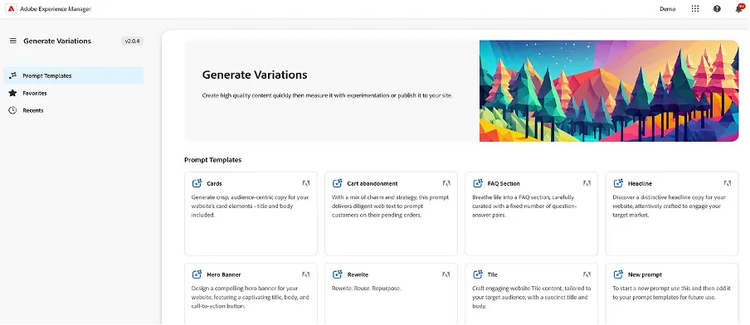
Generate Variations in Adobe Experience Manager.
You can access Generate Variations from:
- Within Adobe Experience Manager (AEM) as a Cloud Service
- The Sidekick of AEM Edge Delivery Services Document-Based Authoring
- Within the Content Fragments Editor
You can get started using a prompt template that Adobe has created for a specific use case. You can edit the existing prompts or create your prompts. You can save these prompts and share them across your organization. Using the prompts you can provide key information like explaining the user interaction, explaining the interaction intent, tone of voice, number of variations required and even setting how strongly the outputs adhere to the prompts.
Once the output is generated, you can preview it alongside the prompts to make changes if necessary. You can even define the audience segments to use in the prompts to generate audience-specific content. Users can even select and use the segments defined in Adobe Target or upload segments using a CSV file.
After this, you can generate images (hero images, banners, website content, etc.) for your copy variations using Adobe Express and the generative AI capabilities of Adobe Firefly. Once generated you can use the content on any of your digital properties like website, social media, email campaigns, mobile apps or perform experimentation.
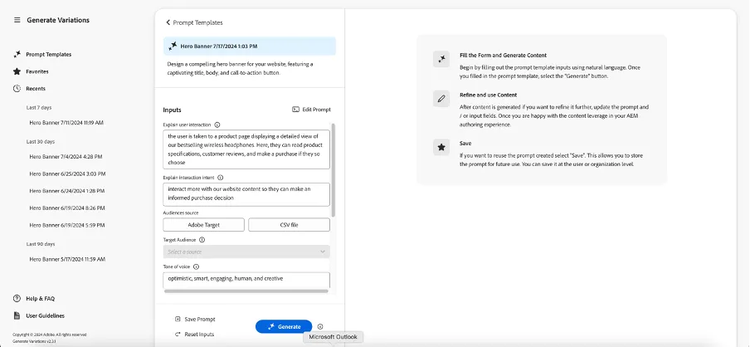
Template and prompts for generating variations in Adobe Experience Manager.
The generated content variations are shown under the prompt that generated them. Most Adobe prompt templates include an AI Rationale in the variation response. This provides transparency as to why generative AI generated that particular variation.
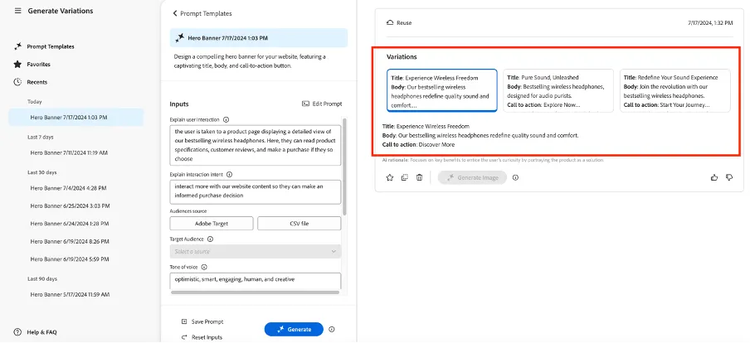
Variations are automatically generated with user-provided inputs and keywords.
If you need to refine the inputs or prompt, you can make adjustments and generate variations again to get a set of new responses. The new prompt and response are shown below the initial prompt and response; you can scroll up and down to view the various sets of content.
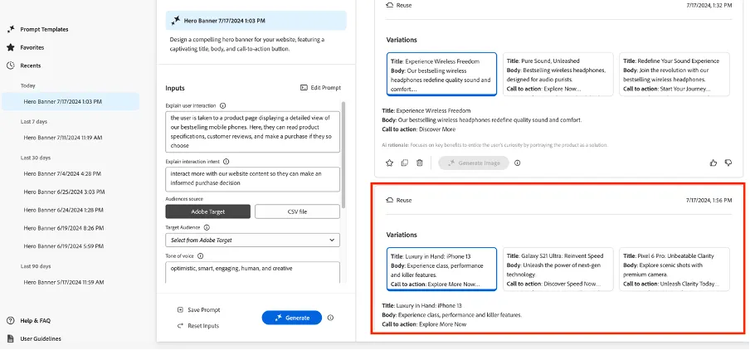
Refining the variations by making adjustments to the prompts.
After you have generated text variations, you can generate images in Adobe Express using the Generative AI capabilities of Firefly. Generate Image is only available if you have an Adobe Express entitlement as part of your IMS organization, and access is granted to you in the Admin Console.
Select a variation, followed by Generate Image, to directly open Text to Image in Adobe Express. The prompt is pre-populated based on your variant selection, and images are automatically generated according to that prompt. You can even write your own prompt in Adobe Express by describing what you would like to see. Once generated, you can use the text and image variations on any of your web pages or testing activities and even download them to your local machine.
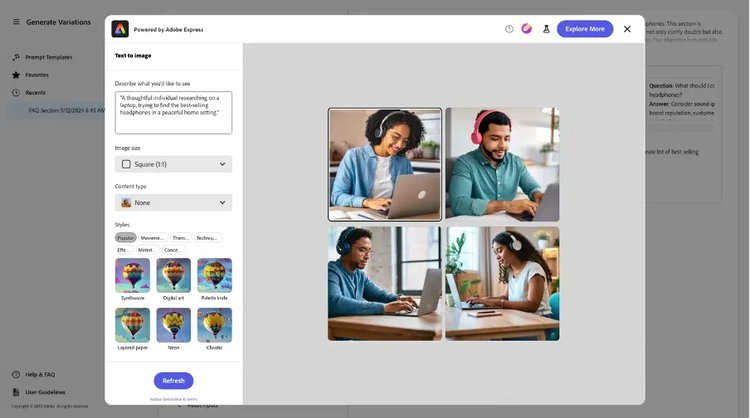
Generating images for your content variations and campaigns.
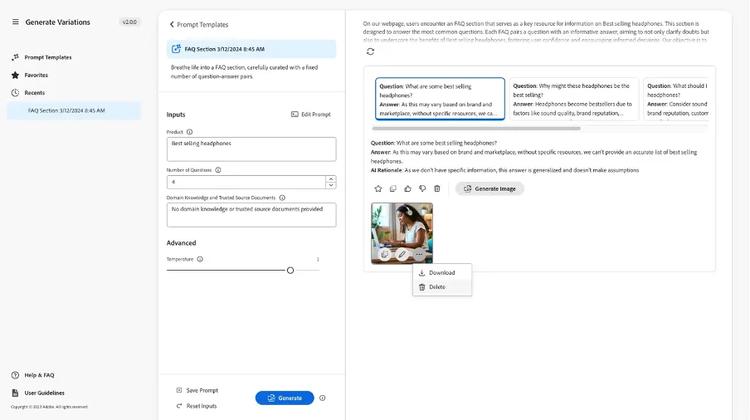
Using the generated images in campaigns, websites, and experiments.
You can use the prompt editor to edit the prompts in your template to make them more relevant. You can add new prompts or delete any existing prompts in your template to get the best results as per your requirements.
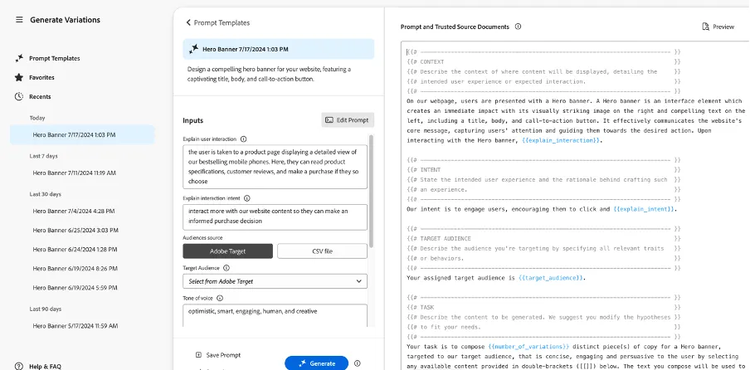
Adding, deleting, and updating the prompts
Generate assets based on generative AI
The biggest change in the digital asset supply change has been the removal of the digitization stage. Previously, physical material needed to be converted to digital using scanners and so on before it could be ingested into the DAM.
In 2024, almost every asset is created using a digital device or on a computer, especially richer media (like images and videos) which are the mainstays of most DAM systems.
Adobe’s generative AI capabilities in Adobe Experience Manager take the content creation process one step further and empower creative and non-creative users to edit and modify these assets directly within the DAM.
Adobe Experience Manager generative AI capabilities, powered by Adobe Express, allow us to simplify and speed up the process of finding, customizing, and generating digital content. This allows more users to create or modify digital assets, inside the DAM itself.
Integrated with Adobe Experience Manager (AEM) Assets, Adobe Express for Enterprise will streamline end-to-end content development workflows, enabling brands to meet ever-increasing demands for customer engagement across channels.
Furthermore, Adobe Firefly will assist by generating images and text effects that are safe for commercial use.
This integration will unleash creativity across every organization, providing AEM Assets users — from marketers to business professionals — with the tools they need to create and distribute compelling customer experiences across digital channels at scale.
You can directly open and edit assets from Adobe Experience Manager Assets in Adobe Express.
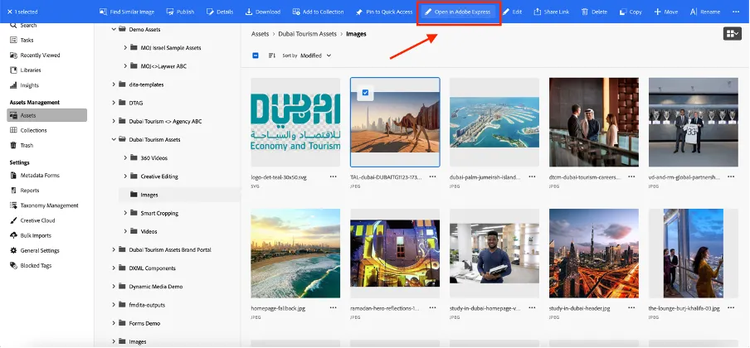
Directly edit assets in Adobe Express from Adobe Experience Manager Assets
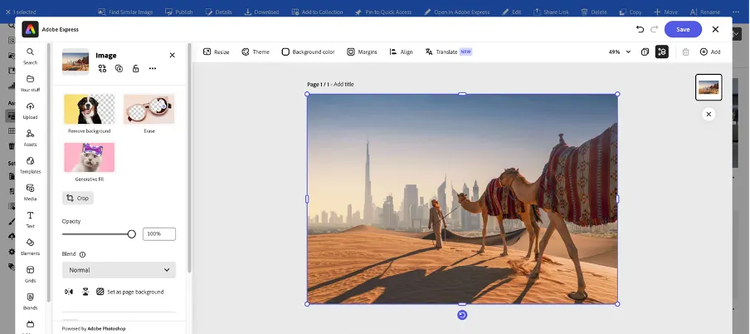
Directly edit assets in Adobe Express from Adobe Experience Manager Assets.
In Adobe Express, you can edit the assets, use the text to image and generative fill capabilities to add objects to the image or create a new image. Like I added the Burj Khalifa building to this image using text instructions.
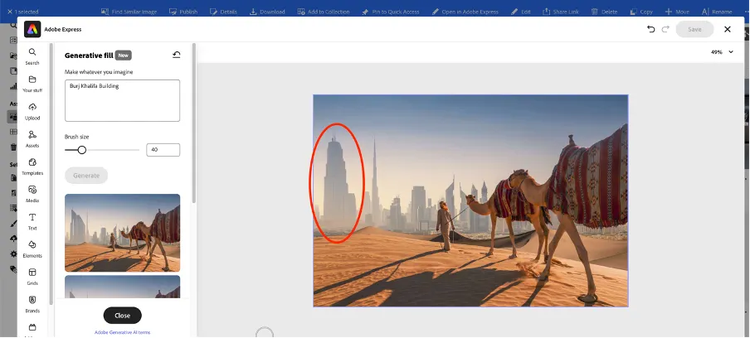
Add new objects in images using generative fill.
You can even access the generate assets functionality from the Adobe Experience Manager search results. If you are looking for a specific image for your campaign and are not able to find it in the DAM, you can use the Generate Assets feature to create new assets via Adobe Firefly.
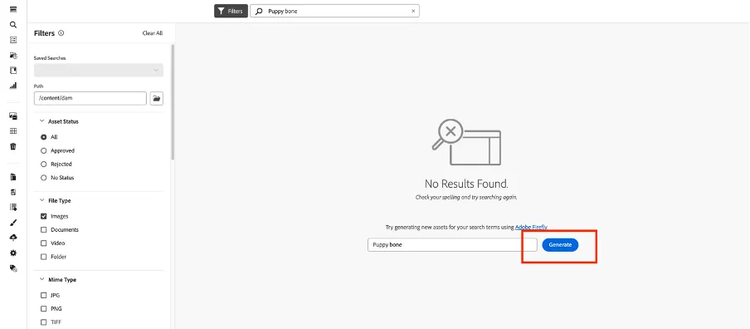
Generate new assets in Adobe Experience Manager Assets using Adobe Firefly.
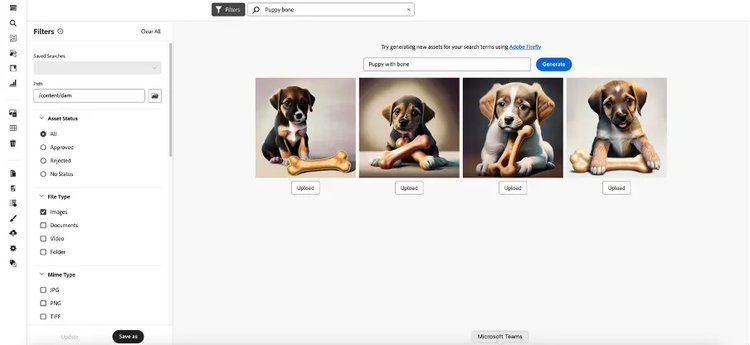
Adobe Experience Manager Assets with Content Hub
As a marketer, you sometimes need to collaborate with internal or external partners to quickly create, manage, and deliver relevant digital content to customers. Timely delivery of relevant content across the entire customer journey is critical to driving greater demand, conversion, engagement, and customer loyalty.
However, it is a challenge to develop solutions that support efficient and secure sharing of approved brand logos, campaign assets, or product shots with extended internal teams, partners, and resellers.
Adobe Experience Manager (AEM) Assets with Content Hub focuses on the marketer’s need to effectively collaborate with the globally distributed users by providing asset distribution capabilities.
With Content Hub in AEM Assets, you can democratize assets across the organization to access, share, and reuse content. Marketers can remix in-content with the power of the integration with Adobe Express with generative AI features powered by Adobe Firefly.
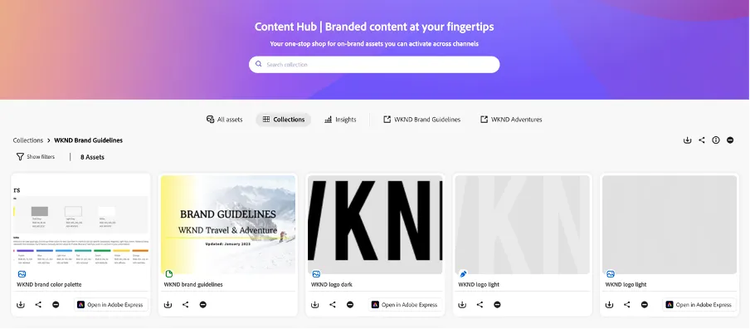
Adobe Experience Manager Content Hub
The content hub allows internal and external users, digital agencies, print partners, channel partners, etc. to search for branded and approved assets for consumption and use across channels. Users can narrow down the search results using filters.
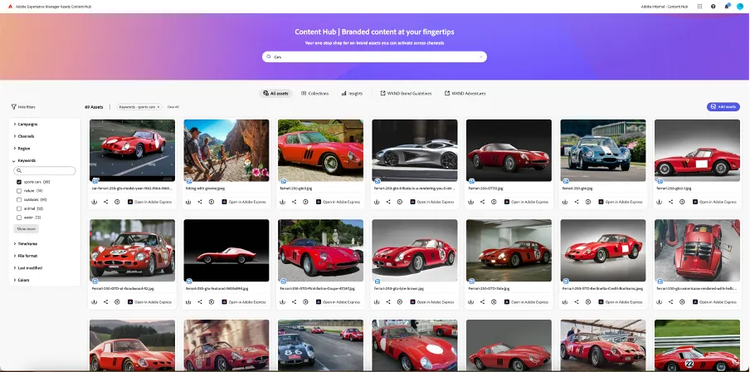
Searching in AEM Assets Content Hub
Within Content Hub, you can create collections for specific types of assets, specific projects, etc., and share links to these collections with other users.
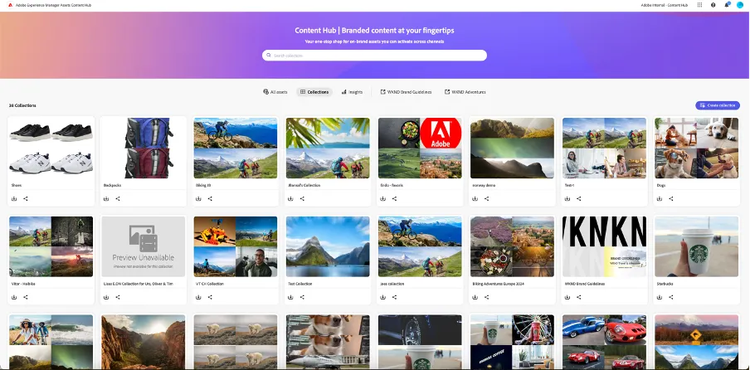
Creating Collections in Content Hub
Authorized users can add assets to the Content Hub via their Adobe Experience Manager authoring interface or add directly through Content Hub UI. While uploading the assets users can also add relevant metadata for the assets like campaign name, keywords, channels, region, etc., which is stored along with the assets.
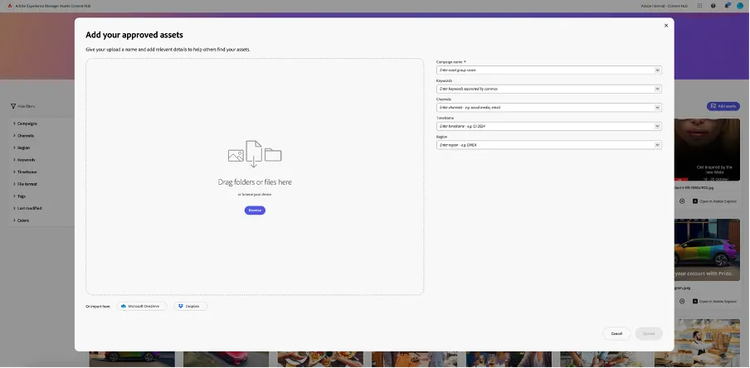
Uploading Assets in AEM Assets Content Hub
Customers can generate a variety of reports to track the different types of assets in the Content Hub and measure the usage across channels.
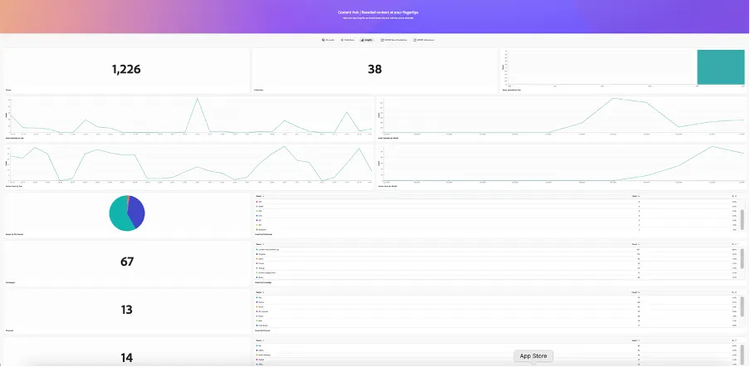
Reporting in AEM Assets Content Hub
Content Hub also allows users to share assets with other users with a set expiration date.
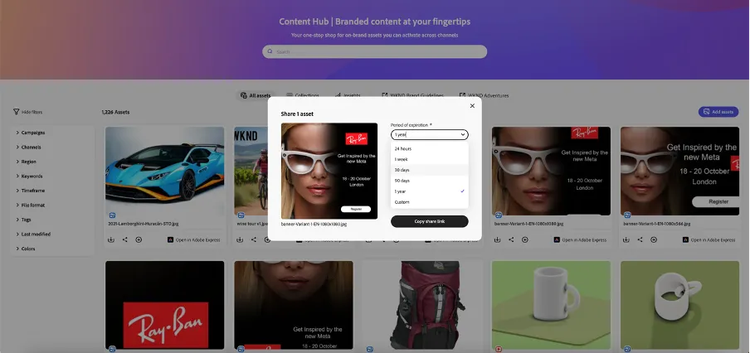
Sharing Assets via AEM Assets Content Hub
Content Hub allows users to edit the assets via integration with Adobe Express. Users can directly open up the assets for editing in Adobe Express, make edits, and use the Generative AI-based capabilities to add new objects to the image and sync the changes to Content Hub, like I added some trees to the car image below and saved the new variation to Content Hub.
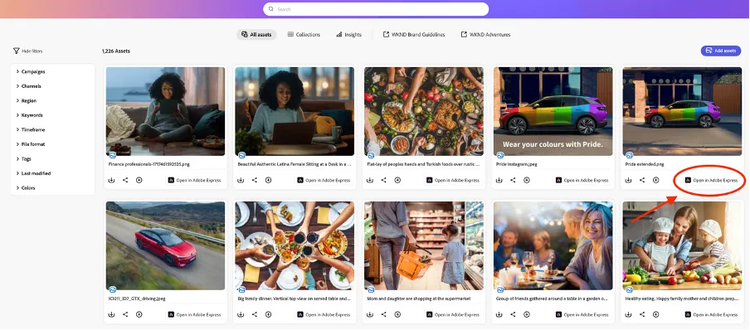
AEM Assets Content Hub and Adobe Express Integration.
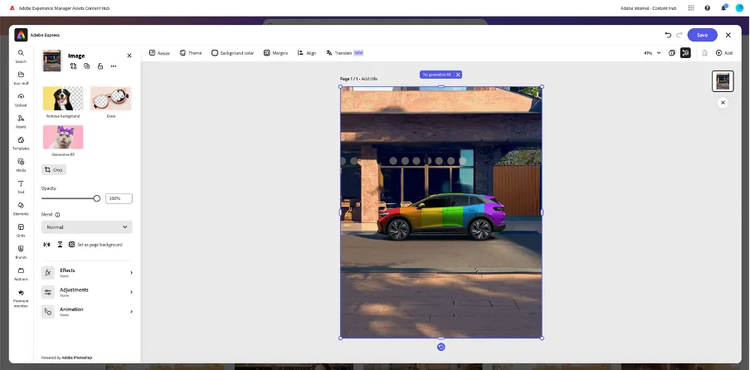
Editing Images within AEM Assets Content Hub.
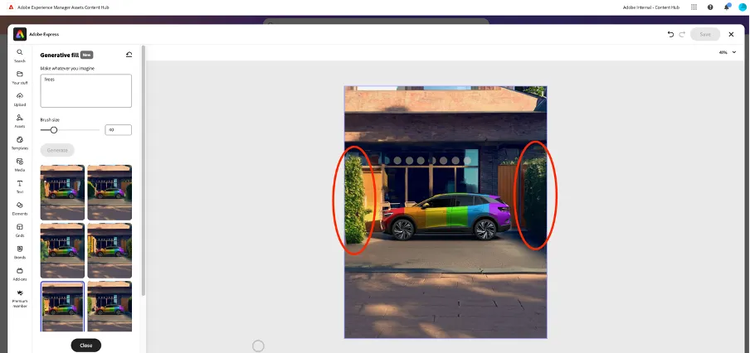
Using Adobe Express and Firefly to generate new image variations.
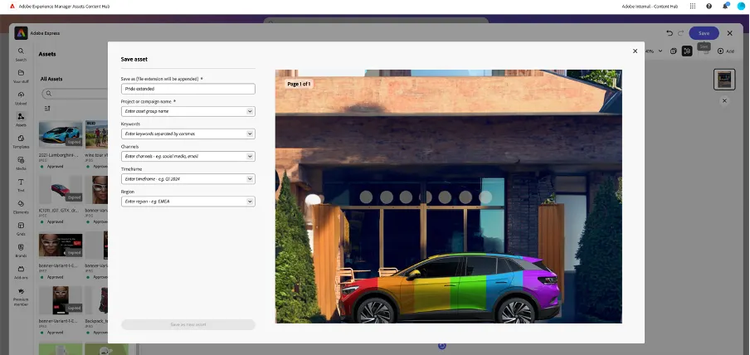
Saving the new variations in AEM Assets Content Hub.
What are Adobe Experience Manager Sites?
Adobe Experience Manager Sites is the industry-leading content management system that empowers any marketer or developer to create high-performance pages across any digital property — from web to mobile to apps.
To meet customer expectations, brands must deliver a wider variety of web and app content at a faster pace. Experience Manager Sites enables every marketer to create and edit webpages quickly.
- Increase productivity with flexible authoring tools for different types of content contributors.
- Leverage familiar tools like Microsoft Word or Google Docs to create and edit pages without specialized application knowledge.
- Content authors who want to work within the application can use an intuitive visual editor to create or edit pages.
Improved load times and responsiveness boost search rankings, traffic, and conversion. Experience Manager Sites is the only CMS on the market with out-of-the-box capabilities to achieve maximum performance.
- Dramatically improve Core Web Vitals and Google Lighthouse Scores.
- Rank higher in SEO.
- Deliver pages faster to reduce bounce rates and keep your customers engaged.
Experience Manager Sites makes experimentation and testing quick and easy — without the need for additional development cycles or integration with third-party vendors — thanks to built-in experimentation and automated reporting capabilities. Combined with Document-based Authoring you can:
- Run A/B simple tests fast.
- Run full-page experiments across design, content, and UX at the same time.
- Access insights easily via chatbot to get faster answers on page performance.
Experience Manager Sites offers simple-to-use tools that allow you to create, manage, and deliver engaging content across your digital properties.
- Collaborate globally with consistent design systems, reusable content components, direct access to governed assets, and translation workflows.
- Use responsive design tools to create consistent experiences throughout web, mobile, and app journeys.
Experience Manager Sites enables expanded authoring options for headless and headful delivery models out-of-the-box. Content can be created and managed as reusable content fragments that can be delivered in any front-end of choice.
- Work with intuitive and comprehensive APIs.
- Get a broad catalog of ready-made extensions, or build your own integrations with our third-party extensibility framework.
What are Adobe Experience Manager Assets?
Adobe Experience Manager (AEM) Assets is a digital asset management system (DAM) that is built into the Adobe Experience Manager platform. Adobe Experience Manager Assets is a cloud-native DAM built for today’s content needs, letting you easily manage millions of assets to create, manage, deliver, and optimize personalized experiences at scale. With Adobe Experience Manager Assets, you can:
- Boost performance with interactive and immersive assets — including videos and 3D assets.
- Empower collaboration among IT, creative, and marketing teams to create personalized experiences quickly.
- Scale the DAM capabilities over time automatically to meet the demands of customers.
- Track each asset and which team uses it to make real-time modifications and optimizations to each experience.
- Personalize and customize assets with easy design tools and Adobe Firefly to create new experiences and variations for specific use cases.
- Pull brand-approved assets from Experience Manager Assets to Adobe Express to create or localize content variations.
What is Adobe Express?
Adobe Express is the all-in-one AI content creation app that anyone on your team can use. Adapt content from designers or create your own. Keep all your projects on brand. Streamline your workflows with real-time collaboration. Available on the web and mobile. Anyone can easily create content that stands out.
- All-in-one editor: Make images, videos, PDFs, social media posts, presentations, and more with ease.
- Quick Actions: Do complex edits in a single click. Remove backgrounds, generate QR codes, edit videos, and more.
- Templates and assets: Create campaigns with 220,000+ professional templates and millions of Adobe Stock assets.
Always stay on brand.
- Template locking: Easily access and customize templates with locked elements to maintain brand integrity.
- Brand kits: Create, share, and apply a custom kit of your brand’s colors, fonts, and assets.
- Real-time collaboration: Share feedback and edit projects live with your team, all in one place.
Create even faster with generative AI.
- Generative AI tools: Generate and edit extraordinary templates, images, text effects, and more with a simple description.
- Resize and Auto translate: Instantly resize your content for any channel and translate text into 45 languages.
- Designed to be Commercially Safe: Create content using generative AI features powered by Adobe Firefly and designed to be commercially safe.
Streamline your workflow across apps.
- Linked assets: Your Adobe Photoshop and Illustrator files are automatically synced to any project in Adobe Express.
- PDF editing: Drop PDFs right into Adobe Express to edit text, images, and other design elements, powered by Adobe Acrobat.
- Adobe Experience Manager integration: All your brand logos, videos, and visual assets. All in one centralized hub.

Adobe Express and Adobe Experience Manager Assets Integration
What is Adobe Firefly?
A comprehensive AI platform for content creation, Firefly is designed to be safe for commercial use, scalable across teams, and customizable to your brand.
Generative AI embedded in key tools and workflows.
With the breadth of generative AI capabilities integrated into the tools creatives and marketers use every day, they can ideate and work more quickly as they create images, vectors, and more.
APIs that make it easy to scale and automate production.
Replace manual and repetitive tasks to create hundreds of asset variations faster than ever. Automate, personalize, and localize variations at scale with Firefly Services including APIs for Firefly and Creative Cloud.
Customized Models and Style Kits to keep everything on brand.
Generate on-brand imagery by training a customized Firefly model with your styles and subjects. Maintain consistency and scale content creation across teams by building, saving, and sharing styles, campaigns, text prompts, and more with Style Kits.
Responsibly designed to be safe for commercial use.
Create with confidence knowing that our Firefly generative AI models were trained on licensed content, such as Adobe Stock and public domain content where copyright has expired. We won’t train our foundational Firefly models with your Customised Model training data. Customers on qualifying plans are eligible for IP indemnification for generated imagery (terms apply).
More details:
https://business.adobe.com/products/experience-manager/sites/aem-sites.html
https://www.adobe.com/in/express/business
https://www.adobe.com/in/creativecloud/business/enterprise/firefly.html
https://business.adobe.com/products/experience-manager/assets/aem-assets.html