UXP Arrives in Premiere: A New Era for Plugin Development

We’re thrilled to announce that the Unified Extensibility Platform (UXP) has officially graduated from beta and is now available in Adobe Premiere 25.6!
This release represents a major step forward in modernizing our extensibility ecosystem. Over the past year, we’ve been blown away by the innovative development use cases shared during the beta. We would like to extend a huge thank-you to everyone who tested early builds, reported bugs, and shared their development journeys with us.Your engagement has been instrumental in reaching this milestone.
Getting started with UXP in Premiere v25.6
Whether you’re migrating an existing CEP panel or building something entirely new, we want to ensure your workflow is smooth. Here’s how to get started:
- Update your tools: Ensure you have Premiere v25.6 installed. You will also need the latest build, v2.2.1, of the UXP Developer Tools (UDT) to load, debug, and package your plugins. You can download the UDT through Creative Cloud Desktop.
- Explore the Sample SDK: We’ve updated our sample code to help you hit the ground running. The Sample SDK provides practical examples of how to interact with the Premiere API using UXP. Check out the samples here.
- Consult the documentation: Our documentation has been refreshed for the v25.6 release. It covers the available core UXP and Premiere API surfaces needed to help you build your panels. Access the documentation here, and check out the recipes and tutorials to get started.
Publish your plugins
For those of you who have been developing alongside us during the beta — the wait is over. If your plugin is polished and ready for distribution, you can now submit it to the Adobe Marketplace for approval.
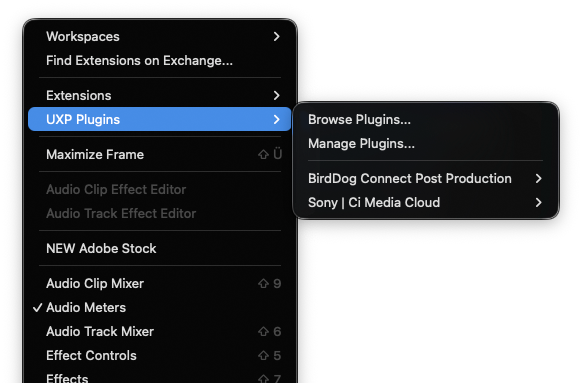
Installed UXP plugins can be found in the new UXP Plugins submenu under ‘Window’.
Join the conversation
This general release is just the beginning for UXP in Premiere. We would love your input to help prioritize what comes next. The Creative Cloud Developer Forums remain the best place to ask questions, help fellow developers, and — most importantly — tell us what you need.
Please continue to share your use cases, feedback, and feature requests on the forums. Your input directly influences our roadmap and helps us shape the platform to serve your needs better.
Please also join our monthly office hours and subscribe to our monthly developer newsletter to stay well-informed: https://developer.adobe.com/developers-live.
Thank you for your continued partnership. We can’t wait to see what you build next.
Happy developing!