Adobe Express Add-on Platform Updates: Spring 2026 Digest
Spring 2026 brought an interesting set of updates that may look incremental in isolation but together represent a bigger shift. Adobe Express add-ons have moved beyond changing the design in an Adobe Express document. New tools help them better understand document structure, intent, and context well enough to orchestrate real-world outcomes.
These changes are especially valuable for high-volume creators in Adobe Express (sales, marketing, social, HR, education, and more), where users need to reliably produce, reuse, and ship content at scale. In this post, we’ll summarize the most impactful platform changes from Spring 2026 and explain how they come together to unlock enterprise-ready workflows.
Pull reusable assets from completed content
A pattern that comes up regularly for enterprise teams using Adobe Express is finishing a piece of content and then needing to reuse parts of it elsewhere. Historically, that meant duplicating pages and elements, then manually rebuilding assets.
The following capabilities added this spring unlock new enterprise workflows for reusing assets :
- Element-level renditions: The VisualNode.createRendition() API allows add-ons to generate images from elements in an Adobe Express document, such as shapes, text, or groups.
- Presentation type check: By calling document.isPresentation(), add-ons can check whether a document is a presentation before offering presentation-specific actions, such as PowerPoint export.
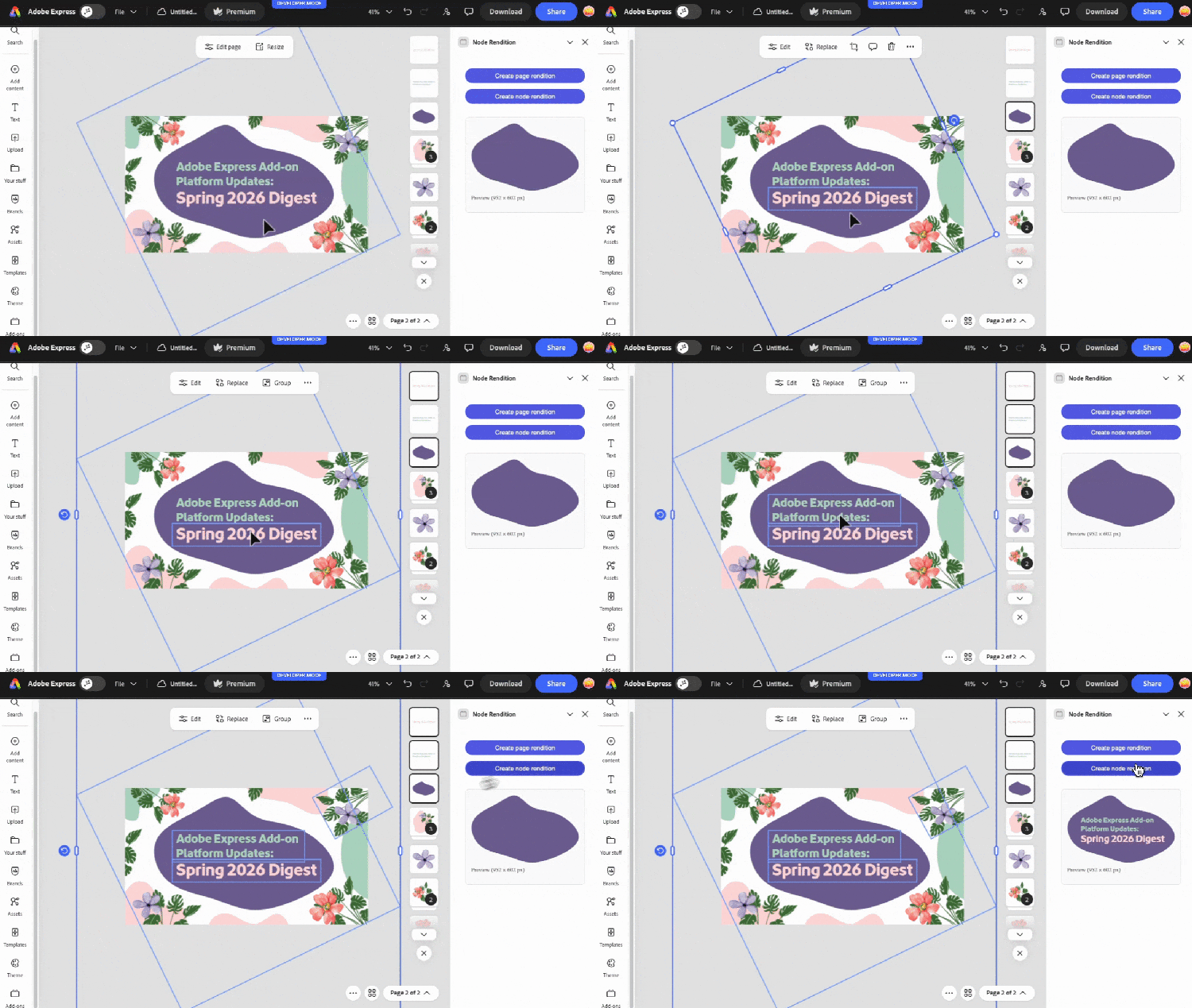
Add-ons can leverage these updates to help enterprise teams reuse approved content at scale, with less duplication and fewer manual steps. See the Create Rendition guide for more details.
Examples:
- Marketing and social teams can design a campaign asset once, then pull out elements like a CTA banner or product image to reuse across Instagram, Facebook Ads, and other downstream channels.
- Technical sales teams can give a presentation, then use the completed deck as the source of truth, exporting diagrams or visuals to include in customer proposals or follow-up communications.
- Teams in higher education can cherry-pick diagrams or grouped visuals from a larger design to dynamically build worksheets or handouts without having to rebuild content from scratch.
Content controls that preserve the design
Another challenge for enterprise teams is making changes to content without breaking the design. Users need to update a description, replace localized text, or swap images, but expect the underlying design to remain consistent. These changes often require manual cleanup, which doesn’t scale well ( especially for documents that are reused frequently ).
Several new capabilities allow add-ons to safely update content in place:
- Manage text flow: Add-ons can use Threaded Text to control the text layout and define how it flows across frames in the design.
- Element resizing: The Node.resize() API gives add-ons powerful, fine-grained control over resizing elements in the document.
- Replace image assets: Using replaceMedia(), add-ons can replace existing image assets with new ones without changing the design.

Add-ons can now provide reliable ways for users to update content in place while preserving the original design intent.That’s especially valuable for enterprise use cases, where these features create efficiency improvements at scale.
Examples:
- Marketing teams maintaining a product one-pager or feature comparison could change the product copy, images, or visuals while keeping the document’s layout and structure intact.
- Teams in higher education could create posters or resources with dense copy and supporting visuals, then iterate on the content without having to rework the design.
- Legal and HR teams creating policy documents or onboarding materials could use a specific design, then update the text or visuals without manual cleanup of the layout.
Understand element meaning, not just location
This spring, add-ons gained deeper access to document structure and content, especially text. The new allDescendants and allTextContent accessors can get a flattened view of everything on a page or inside a visual node, even nested content. The new TextContent interface also provides direct access to the data extracted from a text node.
These capabilities make it possible for add-ons to build powerful, context-aware experiences that are especially valuable to enterprise users. Where add-ons once understood only element location, they can now retrieve the full document structure and reason about content at a semantic level, operating from intent rather than layout details (for example, “this text is grouped with an image, so it’s probably a caption or description”).
Examples:
- Legal teams managing compliance and governance concerns can scan all the text in a document to identify outdated product names, restricted phrases, or incorrect language, without needing to know how that text is arranged in the design.
- Marketing and social teams can use intelligent workflows to generate social captions, summaries, or alt text based on the full context of a document rather than only the selected elements.
- Design teams can examine the balance of text and visual elements, analyze the hierarchy and nesting, and then make recommendations based on how that content is structured.
Platform improvements from Spring 2026
This spring, the Adobe Express add-on platform continued to grow and mature in ways that directly support higher-quality add-ons.
The Adobe Express Developer MCP Server is now stable and production-ready, providing a strong foundation for your local development with AI-assisted coding tools. The API designs and interfaces for core layout controls like Node.resize() were refined and improved before being released to stable.
Important, valuable new documentation landed that covers core aspects of the add-on platform, such as Add-on Architecture, Project Anatomy, Terminology, and Constants. These guides are excellent resources for add-on developers, but also have a meaningful impact on the overall quality of AI-generated code when building add-ons.
From editing to orchestration
Spring 2026 marked an important shift for the Adobe Express add-on platform. Add-ons have outgrown old limitations and are now able to understand content more deeply, update it safely, and orchestrate real, valuable work and deliverables for teams using Adobe Express.
As Adobe Express continues to grow and see enterprise adoption, add-ons play an essential role in maximizing the value these users get from Adobe Express. The capabilities released this spring lay the groundwork for add-ons to meet emerging new use cases and actively power end-to-end content workflows.
Some next steps for you to take:
- Set up the Adobe Express Developer MCP Server in your AI-assisted coding tool, then ask it to build an add-on using the new layout controls for threaded text and resizing elements.
- Go to the Code Playground and tinker with visual node renditions.
- Browse the official changelog and learn about recent updates.
- Register for Adobe Express Office Hours on April 22.
- Join the Adobe Express Discord and say hello in #add-on-developers.
Thanks for being part of the Adobe Express add-on community, and happy building!