New ESLint Plugin Catches Common Premiere UXP Bugs

Writing UXP plugins for Premiere means working with APIs that have usage patterns that can be easy to get wrong. Many of the mistakes that come out of this, such as incorrect Action scoping, missing transaction context, or async work where it is not allowed, do not produce a clear error at load time. This can result in broken undo behavior, silent state corruption, or a crash that only reproduces under specific circumstances.
ESLint is a static analysis tool for JavaScript and TypeScript projects which can be used to check for these kinds of bugs and smells during the development process that would cause issues at runtime. ESLint is highly customizable from its configuration options and myriad of available plugins that can be added and used for various projects, including those for Premiere UXP Plugins. We have published an ESLint plugin for Premiere’s UXP APIs, @adobe/eslint-plugin-premierepro, that catches these problems while you are writing code through a series of individually configurable rules.
What the Plugin Checks
The initial set of rules we’ve added to the plugin fall under 3 categories:
Action API correctness (errors)
These rules enforce best practices when working with Actions. The Action-related APIs account for most of the rules in the plugin simply because there are more ways it can be misused, for example:
create*Action()calls must happen inside a nestedProject.lockedAccess()andProject.executeTransaction()set of callbacks,CompoundAction.addAction()must only be called inside of theProject.executeTransaction()callback that provided theCompoundActioninstance,- Async operations (
await,Promises, callbacks) are not permitted insidelockedAccess()orexecuteTransaction()callbacks, and Action/CompoundActionobjects must not be passed or returned outside the scope of the lock/transaction that created them.
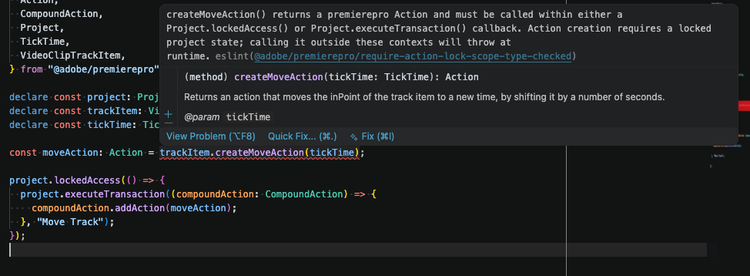
For example, here trackItem.createMoveAction(tickTime) is called outside of a Project lock callback, and the code in question is annotated (here using VS Code with the ESLint extension) to show the error from the plugin:
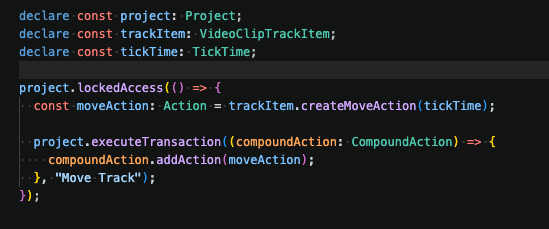
After wrapping the call correctly inside the Project.lockedAccess() callback the error clears immediately:
Undo string for Transactions (warning)
Project.executeTransaction() accepts an optional human-readable string that labels the operation in Premiere’s undo/edit history. The prefer-undo-string rule flags calls that omit it, since an unlabeled transaction produces a generic undo entry that gives users no useful information about what is being undone.
Transaction Wrapping (warning)
The prefer-locked-access-wrapper rule checks that Project.executeTransaction() calls are wrapped inside a Project.lockedAccess() callback function. This is the pattern the Premiere docs recommend for plugin code that needs to set up state before the transaction runs.
Getting Started
We will continue to add and update rules for using Premiere’s UXP APIs going forward. If you’re interested in learning more I encourage you to check out the plugin’s documentation as well as companion docs on the Premiere UXP documentation site:
- Plugin on NPM:
@adobe/eslint-plugin-premierepro - Source and rule documentation: https://github.com/adobe/eslint-plugin-premierepro
- Full setup guide: https://developer.adobe.com/premiere-pro/uxp/resources/fundamentals/eslint-support/
If you’re new to using ESLint and its static analysis tooling, I’d highly recommend starting from the official ESLint (and TypeScript with ESLint) websites for their comprehensive documentation:
- ESLint: https://eslint.org/docs/latest/use/getting-started
- TypeScript: https://www.typescriptlang.org/
- TypeScript and ESLint: https://typescript-eslint.io/getting-started/
- Typed linting: https://typescript-eslint.io/getting-started/typed-linting
If you have questions, have suggestions for other rules you might find useful, run into a pattern the plugin does not currently catch, or a false positive you want to report, please open an issue on the Github repository.