Build-Time Wasm Module Splitting: Ship More Features Without Growing Your Startup Bundle

A build-time technique that separates startup-critical code from the rest of your WebAssembly binary, without the repeated profiling runs that Emscripten’s built-in splitting requires.
If you ship a WebAssembly (Wasm) module that keeps growing as you add features, this is a way to keep your critical rendering path lean. On Acrobat Web, Wasm is at the heart of delivering rich PDF viewing and editing functionalities. The underlying Wasm technology also powers products such as Adobe’s PDF integration with WhatsApp and the PDF Embed API.
We hit the same wall any growing Wasm app eventually hits: Every feature added to the module made the first load slower, and our existing optimizations stopped being enough.
What you can do with this
At a high level, this technique replaces repeated profiling with a static analysis pass you run at build time:
- Walk the call graph of your compiled Wasm module with Binaryen’s
wasm-opt --print-call-graph. - Mark the exported functions your app actually calls during startup, plus all global and static initializers, as functions that must stay in the primary module.
- Build a debug version of the module (
-g, no-sSPLIT_MODULE) and parse the DWARF info to identify folders or namespaces that are safe to defer, using a path- or namespace-based ruleset. - Feed the resulting function list into Binaryen's
wasm-splitto produce a primary module and a secondary, deferred module. - Re-run this on every build. No profiling corpus, no reruns against a document set, no drift between releases.
The sections below walk through why we needed this and how each step works.
The growing Wasm bottleneck
In an earlier post, we walked through several approaches we used to optimize our critical rendering path and speed up first page render, including Wasm swapping and dynamic linking.
Dynamic linking works well for code that is genuinely independent, like third-party libraries. It works less well once your own engine code becomes too interconnected to split cleanly. As we kept integrating new PDF engine capabilities that were no longer isolated enough to be spilt cleanly, our Wasm module kept growing.
Every addition slowed the critical rendering path further: larger load times from unnecessary code downloaded upfront and wasted network bandwidth competing with the rest of the app.
That is what led us to Wasm module splitting.
What is Wasm module splitting?
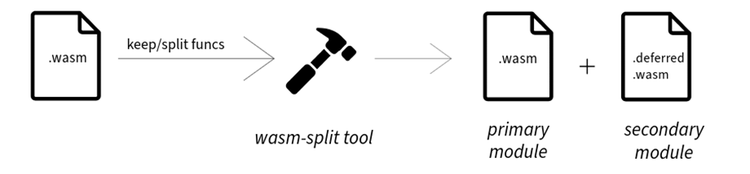
Wasm module splitting is a technique that breaks a single large Wasm binary into smaller modules. Instead of forcing users to download everything at once, we split the module into:
- a primary module, containing only the functions required for initial execution, and
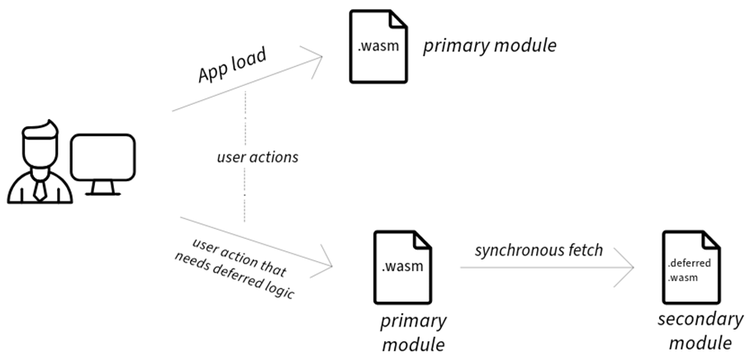
- a secondary module, containing deferred functions that are loaded on demand.
It’s done by a tool called wasm-split from Binaryen, which does the splitting based on a provided list of functions to keep in (or defer from) the primary module.
Emscripten already supports Wasm module splitting through the -sSPLIT_MODULE flag, which instruments a module to load the secondary module automatically when the primary module needs it.
Why Emscripten's profile-guided approach breaks down at scale
Emscripten's built-in workflow is profile-guided: It instruments your module, you run representative workloads, and wasm-split uses the resulting profile to decide what belongs in the primary module. That works well until your input space gets large and varied.
Two problems showed up for us:
- Missed workflows. PDFs are one of the most varied document formats in use, and a profiling run only ever covers a subset of them. A startup-critical function tied to an uncommon PDF structure can get missed during profiling and wrongly deferred, which delays execution exactly where it hurts most: startup.
- Release overhead. Reducing that risk means growing the profiling corpus (like this one) and rerunning it on every release, even for minor code changes. That doesn’t scale as a repeated release-time cost.
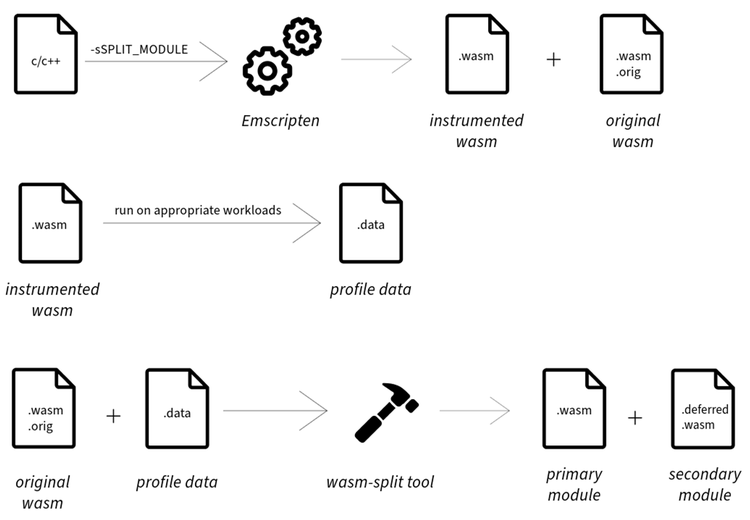
The high-level workflow used by Emscripten’s profile-guided splitting approach
Rethinking module splitting as a build-time problem
Instead of relying on repeated profiling, this approach identifies startup-critical functions using application knowledge, call graph analysis, and a small set of rules, once, at build time. It’s:
- Fast and scalable for large projects.
- Portable across environments.
- Build-system friendly, easy to wire into any pipeline.
- Source-independent, requiring no changes to application code to integrate (getting the most out of the path rules below can call for better-organized source, more on that in Limitations below).

Finding the startup path
We start from two sources of entry points that must stay in the primary module:
- Set A, exported functions used early. Not every function exported to JavaScript is needed at startup. Using our own knowledge of the app, we identify the subset that participates in the early lifecycle.
- Set B, global and static initializers. These always run as part of Wasm startup, so they always stay in the primary module. We identified these once, through a one-time profiling run, the same way Emscripten recommends.
Given a mechanism called getFuncs, which returns every function reachable from a starting function's call stack, the primary module becomes Union(getFuncs(A), B): everything reachable from the early-used exports, plus every initializer.
Implementing getFuncs
Two steps: Generate the call graph with wasm-opt --print-call-graph, then run a depth-first search from a given starting function to collect everything in its call stack.
Handling indirect calls
Direct calls resolve at compile time and show up cleanly in the call graph. Calls resolved at runtime, like C++ virtual functions and function pointers, do not, so getFuncs misses them on its own.
A Wasm module compiled with Emscripten records every indirectly-callable function in its Elem section. We call this set C. Not all of it is needed at startup, and including it wholesale would bloat the primary module right back up, so we need to prune it. That means identifying which parts of set C belong to functionality that is not used during startup, and large C++ codebases typically already encode that boundary through folder structure and C++ namespaces. We use two rule types to capture it:
pathRules, excluding folders or files not needed early, with exceptions. Example: exclude everything infeatureAexceptfileC.cpp.namespaceRules, the same idea applied to C++ namespaces. Example: exclude everything inpdf::featureAexcept thepdf::featureA::corenamespace and its children.
To apply these rules, we build a debug version of the module (-g, same optimizations, no -sSPLIT_MODULE), parse its DWARF info for each function's signature and declaration path, and match against the exclude rules. The result is set D, the functions to defer. We then extend getFuncs to take a second argument, a set of functions to avoid: while walking the call graph, if it hits a function in that set, it skips the function and its entire call tree.
The pruned indirect target set becomes getFuncs(C, D).
The final formula
The complete set of functions to keep in the primary module is:
Union(getFuncs(A), B, getFuncs(C, D))
That is: everything reachable from early-used exports, every initializer, and only the indirect targets that survive pruning.
Algorithm visualization
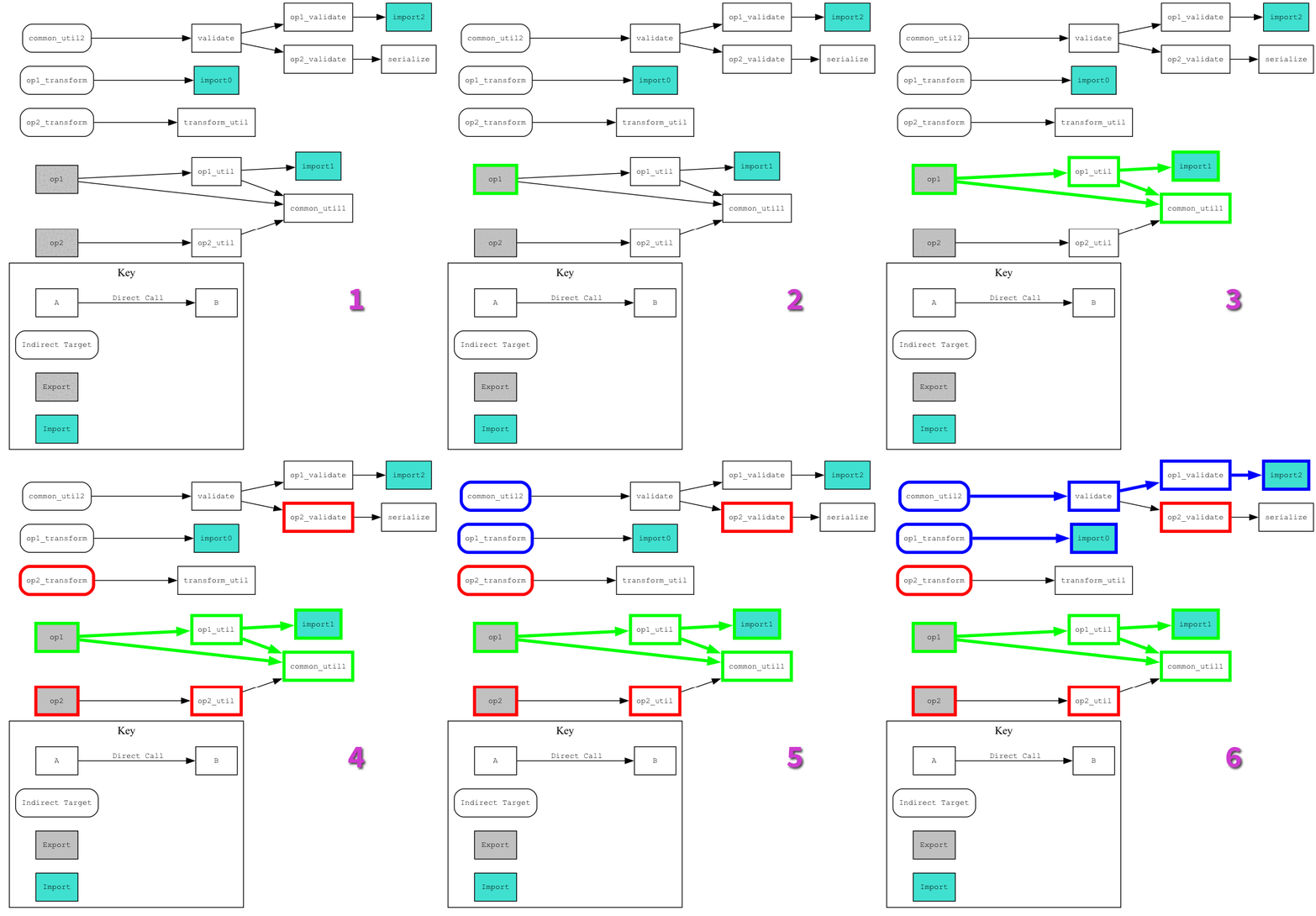
To visualize the above-stated algorithm, consider a Wasm module that includes functions for two operations — op1 and op2. Our goal is to keep the op1-related functions in the primary module while separating the op2 functions into a secondary module.
Here’s the call graph:
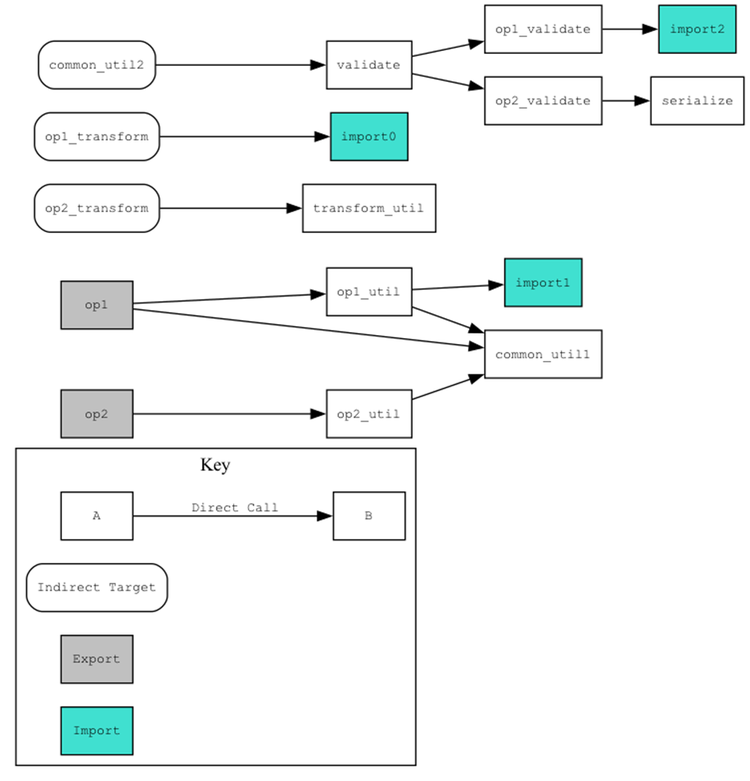
Walking through the algorithm
- Get the call graph of every function in the module.
- Identify which exported functions are called during the early application workflow, using your own knowledge of the app.
- Find the connected components reachable from those functions.
- Find the disallowed function set by building a debug binary, parsing its DWARF info, and applying the exclude rules.
- Identify the functions in the
Elemsection that are callable indirectly. - Walk the connected components from those indirect targets, without entering the call stack of any disallowed function.
At the end, every function reached through steps 3 and 6 goes into the primary module, alongside the initializers from set B.
Limitations
While this approach provides great results, it also has some limitations:
- Emscripten's optimizations under
-gcan leave some release-build function symbols with no match in the debug build, since they were not present to begin with. Those functions have to stay in the primary module, since there is no DWARF data to evaluate them against the rules. - Getting full value out of path rules can require source code to already be organized into modular files and folders. Codebases that aren't will need some refactoring first, though most production codebases already are.
- Function symbols reached only through indirect targets, and not used during early startup, may not be fully eliminated, depending on how the exclude rules are written.
Try it on your own module
The core pieces here, wasm-opt --print-call-graph, DWARF parsing, and wasm-split, are all available through Binaryen and Emscripten today. If your Wasm binary has outgrown what dynamic linking or profile-guided splitting can do for you, defining your own pathRules and namespaceRules on top of the getFuncs approach above is a way to keep your startup path lean without adding a recurring release-time cost.
On our end, this is now the approach we apply to every new feature we integrate into Acrobat Web's Wasm module, keeping the primary module lean as the underlying PDF engine continues to grow. Applying it to our own module brought the primary module down from 11 MB to 9 MB, an 18% reduction in what has to load before first execution.
How much of an improvement you see will depend on your own codebase: specifically, how much of it is genuinely required during the early application lifecycle versus how much can be deferred. A codebase with a lot of feature-specific code outside the startup path has more to gain than one that’s already lean at startup.
Have you run into the same wall with a growing Wasm binary, or tried a different approach to splitting one? Share your experience or questions with our engineering team by filling out this form. We would love to hear how this applies to your build.