Introducing Translate Connectors: Bring Your Organization’s Translation Service into Adobe Express

If your organization wants to translate through a specific provider, you can now make that provider a native part of Adobe Express, instead of a detour your users take outside it.
Adobe Express has had a built-in translation experience for a while, and for many teams it’s exactly what they need. But in a large organization, translation is rarely just a feature choice.
An organization usually has a procurement locked into a provider. A dedicated localization team has spent years building translation memory and an approved glossary around it. Legal and brand teams, meanwhile, expect terminology to come from that one governed source. When the tool in the design isn’t that source, teams fall back to the old loop: export the copy, send it out, wait, import it back, rebuild the layout.
Translate Connectors close that loop. A Translate Connector is an integration you build that registers your organization’s translation service inside Adobe Express. Once it’s connected, your users can localize text right from the Translate panel in Adobe Express, in the design they’re already working in.
Who can integrate Translate Connectors
Translate Connectors are aimed at enterprise developers, contract developers building on an enterprise’s behalf, and translation vendors who want their service available to the organizations that already use it.
If you’re building a general-purpose creative tool for the wider Adobe Express audience, add-ons remain the right surface.
What you need to do
Unlike Adobe Express add-ons, which any developer can build and publish, access to build a public Translate Connector is gated. You start by telling us about your service and your use case.
- Read the developer documentation. Learn more about the right audience for Translate Connectors and what you will be building.
- Once you want to proceed, fill in the interest form to request access. A team reviews each request.
- Build and test in the Connector Playground, from initial service validation through end-to-end integration testing.
What your users actually get
The connector changes what appears in the Translate panel, not how people work. From the user’s side:
- They open a design, go to Edit page, and choose Translate.
- They pick your service from the Translate service dropdown. If they have access to more than one connector, this is also where they switch between them — only one is active at a time.
- They choose target languages from whatever your service supports, since the connector itself defines which languages show up as options.
- If your services expose a tone-of-voice control, they can set it there. That field is entirely up to you: whether to offer it at all, and what options it has, is something you define, and it’s passed through to your service as part of the translation request.
- Adobe Express generates a page per target language alongside the original, so a single-page ad becomes German, Spanish, French, Japanese, Dutch, and Portuguese versions in the same document.
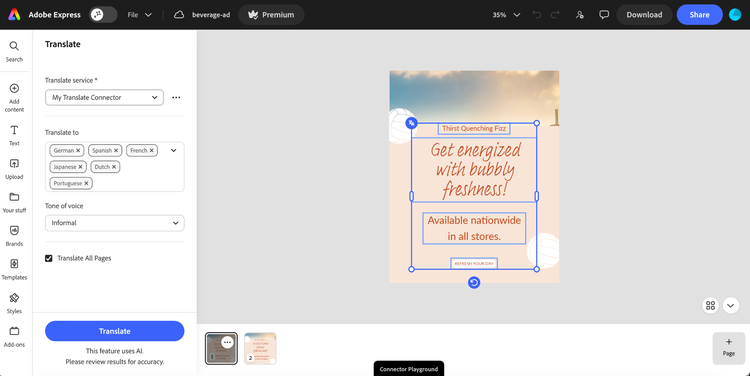
Your connector appears as an option under Translate service. Everything around it — the language picker, the tone-of-voice control, and the option to translate every page — is the Adobe Express interface you didn’t have to build.
Two details are worth being precise about, because they set expectations correctly.
It translates text strings, not the design. The connector operates on the copy in the document. Layout, imagery, and typography aren’t localized for you, and text that expands in translation still needs a human eye.
Brand-locked templates still apply. Localized pages sit inside the same template constraints as the original, so the governance your brand team set up doesn’t get bypassed by the translation step. Some review is still worth doing, but you’re reviewing copy rather than rebuilding a layout.
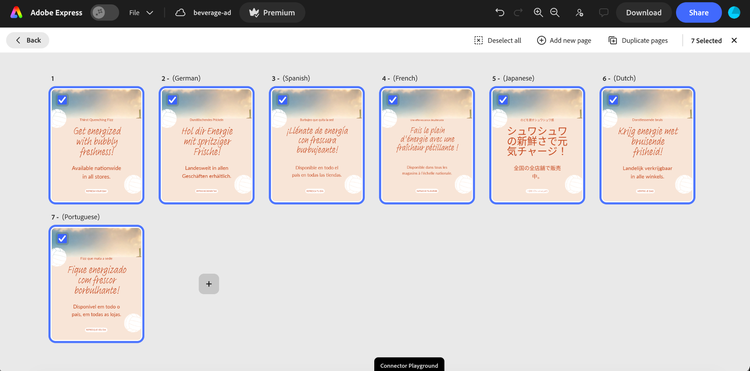
One click produces a page per target language in the same document, each one still inside the original template.
What you build, and what Adobe provides
The interface is already there. You bring your translation service and customize the existing interface to fit your needs — we take care of the rest. Adobe Express provides the panel along with easy-to-use tools for configuring the UI, so you don’t have to build the entire experience from scratch.
What you’re responsible for is the connection itself:
- Hosting. Connect a service you already run, or use Adobe's ready-made templates to adapt it to the Adobe Express schema and run it on Adobe's serverless infrastructure.
- Authentication. Use the method that fits your service, while keeping credentials and connections secure.
- Configuration and testing. Choose which fields and options your service needs; Adobe Express builds the panel controls from that configuration, so you’re configuring the UI rather than coding it. Validate the service and run end-to-end tests in the Connector Playground before anyone in your organization sees it.
Because the connection points at your service, everything your service standardizes comes with it: your translation memory, your terminology, your brand voice, and your machine translation engine. And you’re not choosing between building on your own infrastructure or not building at all: If you would rather not run and maintain the service side yourself, Adobe's templates and serverless hosting cover that too.
You also won’t be starting from zero as a category: Phrase and XTM, two established enterprise translation providers, are already building on this model.
"At an event XTM hosted on translation and AI, the enterprise interest in this integration was immediate. Teams want translation and design decisions happening in the same place, with less back-and-forth between departments to get there."
— Chris Zhang, Sr. Product Manager, Creativity & Productivity Extensibility, Adobe
How you ship a Translate Connector
Once you’re ready, you have three distribution options:
- Private share link. Share with named testers or stakeholders before publishing, or instead of publishing at all.
- Internal listing. Build for your own enterprise users and give them centralized discovery, without publishing the connector more broadly.
- Public listing. After review, the connector becomes available to Adobe Express users in enterprises where it’s enabled, through the Translate service dropdown.
Most enterprise builds will live on the first two. The public listing matters most if you’re a translation vendor, and your customers should be able to turn you on themselves.
Where this sits alongside add-ons
Translate Connectors and add-ons are both in-app integrations, and they’re built for different jobs.
Add-ons extend Adobe Express with new functionality and interface, are open to every developer, and continue to be a first-class part of the platform.
Translate Connectors are narrower on purpose: They connect an existing service to an existing Adobe Express experience, with Adobe providing the interface framework and your organization supplying the translation and its configuration.
If you’ve been asking for a way to make your governed translation stack native to Adobe Express rather than adjacent to it, this is that.
Get started with Translate Connectors
Tell us about your service and your use case, and we will review your request. While you wait, the developer documentation covers the schema and authentication options in detail. Once your request is approved, you’ll get access to the Connector Playground to start building and testing.
If you build something, or hit something that doesn’t fit the model, we want to hear about it. Join the conversation in the Adobe Express developer community, share what you’re connecting, and tell us what would make the next version of this easier to build.