How the Experience Modernization Agent Migrates Sites to Edge Delivery Services
Enterprise site migrations can be execution-heavy by nature.
The destination is usually clear. The architectural benefits are understood. What burns time is the mechanical work: decomposing existing pages into reusable blocks, reconstructing a design system from visual inspection, and scaffolding structure that should have existed from the start.
Adobe Experience Manager’s Experience Modernization Agent automates much of that execution layer.
This article focuses on how it performs site modernization and migration to Edge Delivery Services (EDS). The agent analyzes existing pages, maps them to block-based architecture, extracts design systems, and generates CSS and JavaScript. The resulting changes appear as reviewable diffs in GitHub. Developers describe what they want. The agent performs the mechanical work. Engineers review and push.
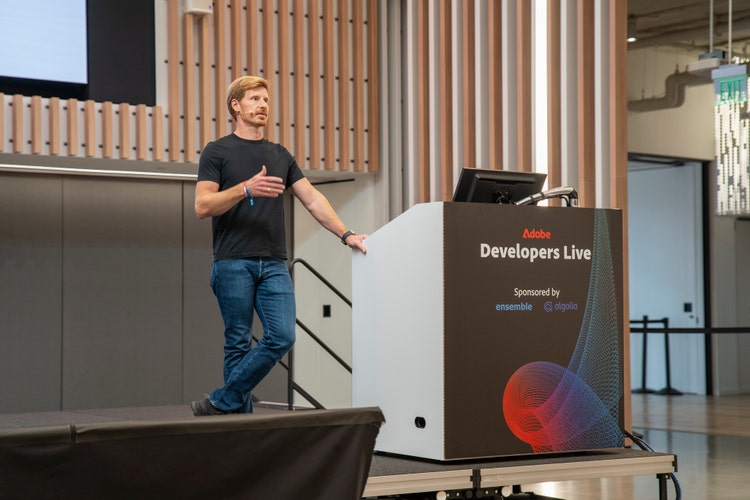
At Adobe Developers Live (Nov 2025), Adobe engineer Karl Pauls demonstrated a full migration of a marketing site using this workflow (see the video below). This post walks through what happens during each stage and where developer judgment still matters.
https://www.youtube.com/watch?v=Euawbpk3q7c
Where the Experience Modernization Agent fits in AEM
The Experience Modernization Agent is the AI development agent responsible for site modernization and migration to Edge Delivery Services.
Within AEM’s agent architecture, it operates as a functional agent under the Brand Experience Agent, which governs how brand and experience assets evolve across sites. Developers typically interact directly with the modernization capability rather than the broader agent hierarchy.
If you want to understand how this capability fits into AEM’s broader agent architecture, see The Agentic Evolution of Adobe Experience Manager, which explains how AEM’s agent layer is structured and how technologies like MCP and agent-to-agent APIs support these workflows.
In practice, developers interact with the Experience Modernization Agent through Adobe’s hosted agent environment. For experimentation and evaluation, developers can start with AEM Playground, which provides an isolated environment for testing agent workflows and Edge Delivery Services projects without connecting production repositories.
Two core capability areas come with the agent :
1. Site creation and migration
- Page decomposition
- Block mapping
- Design system extraction
- Bulk content import
2. Ongoing block development
- Creating new blocks
- Refining templates
- Generating new pages from structured inputs
Both capabilities run inside the same environment.
How the migration workflow runs
Page decomposition
The agent begins by analyzing the structure of the source page.
It identifies content regions such as:
- hero sections
- CTAs
- card grids
- tabs
- accordions
Each region is mapped to a block in the configured EDS block library.
The output is architecture-aligned, not a markup clone.
That distinction matters.
A markup clone preserves the technical debt and layout assumptions of the original site. Block mapping instead rebuilds the page using Edge Delivery conventions so it becomes reusable immediately.
The process is deterministic. Running the same page twice produces the same block output. That repeatability keeps block usage consistent across large migrations involving hundreds of pages.
Design system extraction
Once the content structure is mapped, the agent analyzes the source design system.
It extracts elements such as:
- color palettes
- typography
- button styles
- spacing
- section backgrounds
The agent then updates the global styling layer and generates block-level style variants.
The first pass is typically close, not perfect.
During the demo, Karl Pauls noted that spacing, contrast, or typography adjustments may require follow-up prompts. The workflow assumes iteration rather than expecting pixel perfection in the first run.
Conversational refinement
This is where the workflow differs most from traditional migration tooling.
Instead of editing configuration files and rerunning a pipeline, developers refine the result conversationally.
You might prompt:
- Adjust button color to match brand primary
- Increase section spacing
- Convert card layout to 3-column grid
Each prompt generates inspectable file changes before anything is applied.
During the live demo, Karl modified styling and content interactively. His estimate was 15–20 minutes of prompting to bring a representative marketing page to a reviewable state.
Complex sites may take longer, but the key difference is the starting point. Developers begin with a working page rather than a blank repository.
Why the migration destination matters for AI visibility
Migrating to Edge Delivery Services is important for more than performance.
Traditional enterprise sites were designed for two audiences:
- humans browsing pages
- search crawlers indexing content
AI systems work differently.
Generative search systems and research tools typically:
- fetch raw HTML
- skip JavaScript execution
- enforce strict performance thresholds
If content depends on client-side rendering or slow JavaScript execution, many AI systems simply cannot read it.
Edge Delivery Services solves this by generating lightweight, semantically structured HTML by default.
When a site is migrated using the Experience Modernization Agent, the resulting pages are readable by both humans and AI systems without additional tooling.
If you want a deeper explanation of how this architecture supports AI-native content delivery, see Building the Agentic Web with Adobe Experience Manager, which explores how structured HTML, edge delivery, and agent workflows enable content to be consumed by both users and AI systems.
Migration and AI-readiness happen in the same step.
Generating new pages and components after migration
Once the block architecture exists, the agent can generate new experiences on top of it.
In the demo, Karl created a landing page using:
- a content repository with brand voice guidelines
- an asset catalog containing approved images
- a briefing document defining the campaign objective
The agent:
- selected testimonials
- pulled approved assets
- applied existing block variants
- assembled the page automatically
New pages inherit the same block architecture, ensuring alignment with the design system.
That consistency compounds over time. Each new page stays governed by the same structure.
Figma integration
The workflow also supports design-to-code generation.
When a Figma frame is selected and connected through an MCP server:
- the agent reads layout and content from the design file
- generates a new Edge Delivery block
- produces the JavaScript and CSS
The generated block enters the repository and becomes reusable across the project.
Developers then refine the result through prompts and code review.
GitHub remains the control plane
All generated changes remain in an isolated sandbox until developers push them.
Once ready:
- changes commit to a branch
- a pull request is created
- the branch becomes previewable through Edge Delivery Services
Standard engineering workflows remain intact.
If the output does not meet expectations, the session can be discarded and nothing touches the repository.
The agent compresses the mechanical work of migration. What remains, and becomes more important, is validation.
Developers still need to ensure:
- architectural correctness
- accessibility compliance
- performance governance
- integration quality
The Experience Modernization Agent changes where time is spent, not who owns the outcome.
What the agent does not handle yet
The Experience Modernization Agent currently targets Edge Delivery Services specifically.
It does not support:
- HTL-based AEM Publish environments
- SPA frameworks such as Next.js
- headless delivery architectures
Several areas also require manual work:
- third-party data integrations
- commerce and search functionality
- MarTech data layers and targeting setups
- multisite inheritance (MSM)
- complex business logic such as calculators or configurators
For large enterprise migrations, Adobe also offers an Agentic Outcome Engineer (AOE) delivery model where Adobe engineers operate the tooling alongside the customer team.
How to get started
Developers can explore the Experience Modernization Agent through AEM Playground, which spins up isolated environments for experimenting with Edge Delivery Services projects and agent workflows.
AEM Playground provides a preconfigured sandbox environment where developers can:
- experiment with Edge Delivery Services projects
- test agent-driven migration workflows
- preview generated changes safely
- evaluate block mappings and design extraction
- validate results before applying them to real repositories
Because the environment is isolated, teams can explore migrations without connecting production systems or modifying existing codebases.
The recommended evaluation sequence:
- Select a representative marketing page from an existing site
- Run the migration in a sandbox Edge Delivery Services project
- Review block mapping against your block library
- Inspect generated CSS diffs
- Refine with conversational prompts
- Validate through a pull request preview
One page is usually enough to understand the quality of the generated output and how much refinement your design system may require.
From there, teams can scale the migration across the rest of the site.
Key takeaways
The Experience Modernization Agent automates the most time-consuming parts of site migration to Edge Delivery Services.
Block mapping is deterministic, ensuring consistent results across large migrations.
Design extraction is iterative. The first pass is close and conversational refinement closes the gap.
GitHub remains the control plane. Nothing ships without developer review.
The agent currently targets Edge Delivery Services only.
Migrating to Edge Delivery Services produces AI-readable HTML by default, enabling content to be consumed by both humans and AI systems without additional configuration.
Want monthly AEM updates?
Releases, tutorials, and community highlights — in one focused developer digest.